PPT Image Share Builder
Turn source notes and a reference style into slide images, a QA contact sheet, an image-based PPTX, and a timed speaking script. Free MIT-licensed skill for Codex.
Free
Works with the AI tools you already use
 Claude Code
 Cursor
 Codex CLI
 Muse
Muse Dots+22 moreClaude CodeCursorCodex CLIMuseDots
 OpenClaw
 Manus
Manus Grok
Grok Grok Bot+18 agents
PPT Image Share Builder
Example session with this skill installed
Example request to reproduce the included demo:
Use $ppt-image-share-builder. Create a 10-minute Chinese classroom report on medical-device unannounced inspections using the demo input notes and public sources. Produce a source-backed slide plan, consistent 16:9 slide images, a contact sheet, an image-based PPTX, and a timed speaking script. Follow the reference style and review generated text before delivery.
- Read your context and instructions
- Compiled the ppt image share
- Generated the image
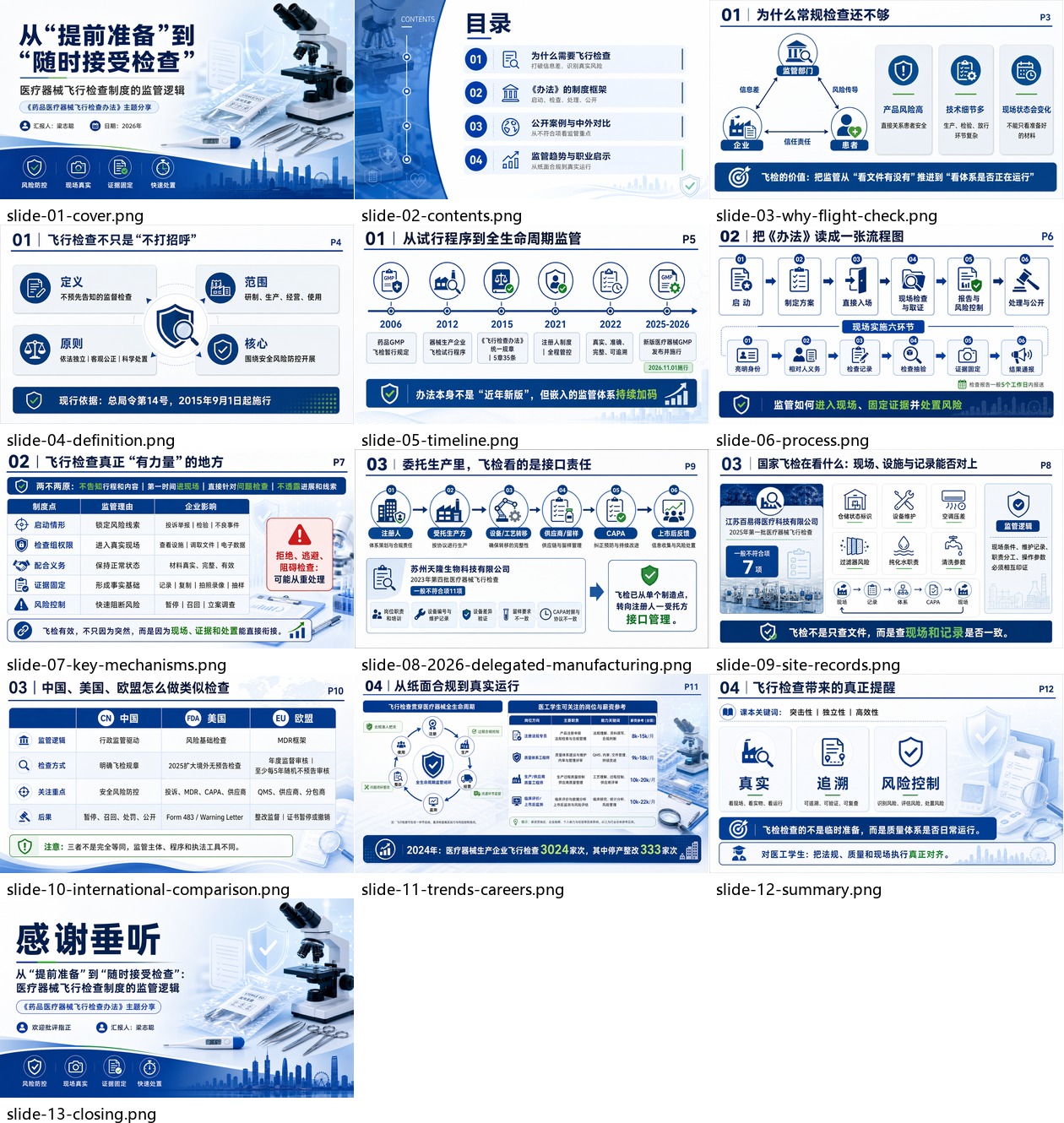
Included real demo: Medical Device Flight Check
This is an existing example shipped with the skill, not a new generation run on this marketplace page. The full deliverables are available in the ZIP and in the linked GitHub folder.
Delivered artifacts
- 13 full-page, numbered slide images.
- A deck contact sheet for visual QA.
- An image-based PowerPoint deck.
- A page-by-page image outline and source-backed content plan.
- A 10-minute Chinese speaking script.
Complete slide sequence
| Page | Topic |
|---|---|
| 1 | Cover |
| 2 | Contents |
| 3 | Why unannounced inspections matter |
| 4 | Definition |
| 5 | Timeline |
| 6 | Process |
| 7 | Key mechanisms |
| 8 | Delegated manufacturing in 2026 |
| 9 | On-site records |
| 10 | International comparison |
| 11 | Trends and careers |
| 12 | Summary |
| 13 | Closing |
Full files
Using the result
Review generated text and verify time-sensitive source claims before presenting. Rehearse with the speaking script and revise only affected slide images. The PPTX preserves the image designs; it does not provide individually editable text and diagrams.
ppt-image-share-builder.png
PNG · 1536×1024
Example file from a real run - the skill writes it into your workspace.
Connects securely to your tools. The creator never sees your data.
About this skill
PPT Image Share Builder is a free, MIT-licensed Codex skill for classroom reports and lecture-style presentations. Start with a topic, source files, and a reference presentation style; the workflow guides source-backed planning, consistent slide-image generation, visual QA, PowerPoint delivery, and a timed speaking script.
What you get
- A sourced slide outline and per-slide image-generation prompts.
- Consistent 16:9 slide images generated with your available raster image tool.
- A contact sheet for reviewing the whole deck and identifying pages to revise.
- An image-based PowerPoint file that preserves the final slide designs.
- A speaking script matched to your presentation duration.
Included SKILL.md, workflow and QA references, Python helper scripts, English and Chinese documentation, a real image-generated demo, and a clearly marked synthetic fallback demo.
Requirements and limits Designed for Codex with local file access and an available raster image-generation tool. Python 3.10+ is recommended for helper scripts; install Pillow and python-pptx from requirements.txt. Image-generation access and any provider charges are separate; no API keys or service credits are included.
The PPTX contains full-page images: text and diagrams inside those images are not individually editable PowerPoint objects. Review generated text and factual claims before presenting. Dense Chinese text may need a separate exact-text composition step. Compatibility with other agents has not been verified.
Free and open source under the included MIT license. GitHub: https://github.com/uuoov/ppt-image-share-builder Support: https://github.com/uuoov/ppt-image-share-builder/issues
How to install
Works the same in every agent - Claude, Cursor, Codex, Copilot and 20+ more.
- 1
Download the ZIP
Free skills download straight away. Paid skills unlock right after purchase.
- 2
Unzip into your skills folder
Every agent reads skills from one folder on your machine. Drop the unzipped folder in there.
- 3
Ask your agent to use it
Restart the agent if it was already running. It picks the skill up automatically - no config needed.
Skills folder by agent
Click the path to copy it. Create the folder if it does not exist yet.
Reviews
No reviews yet
Be one of the first to try it. Every listed skill passes our trust checks below.
Security scanned
Passed our 8-point scan before listing
Fresh listing
Recently published to Agensi
Free forever
No account required to browse
Trust & safety
Security scanned
Verified clean 2 days ago
- Free to download with an account