More screenshots
Works with the AI Agents you already use
 Claude Code
 Cursor
 Codex CLI
 Muse
Muse Dots+22 moreClaude CodeCursorCodex CLIMuseDots
 OpenClaw
 Manus
Manus Grok
Grok Grok Bot+18 agents
Shipgate
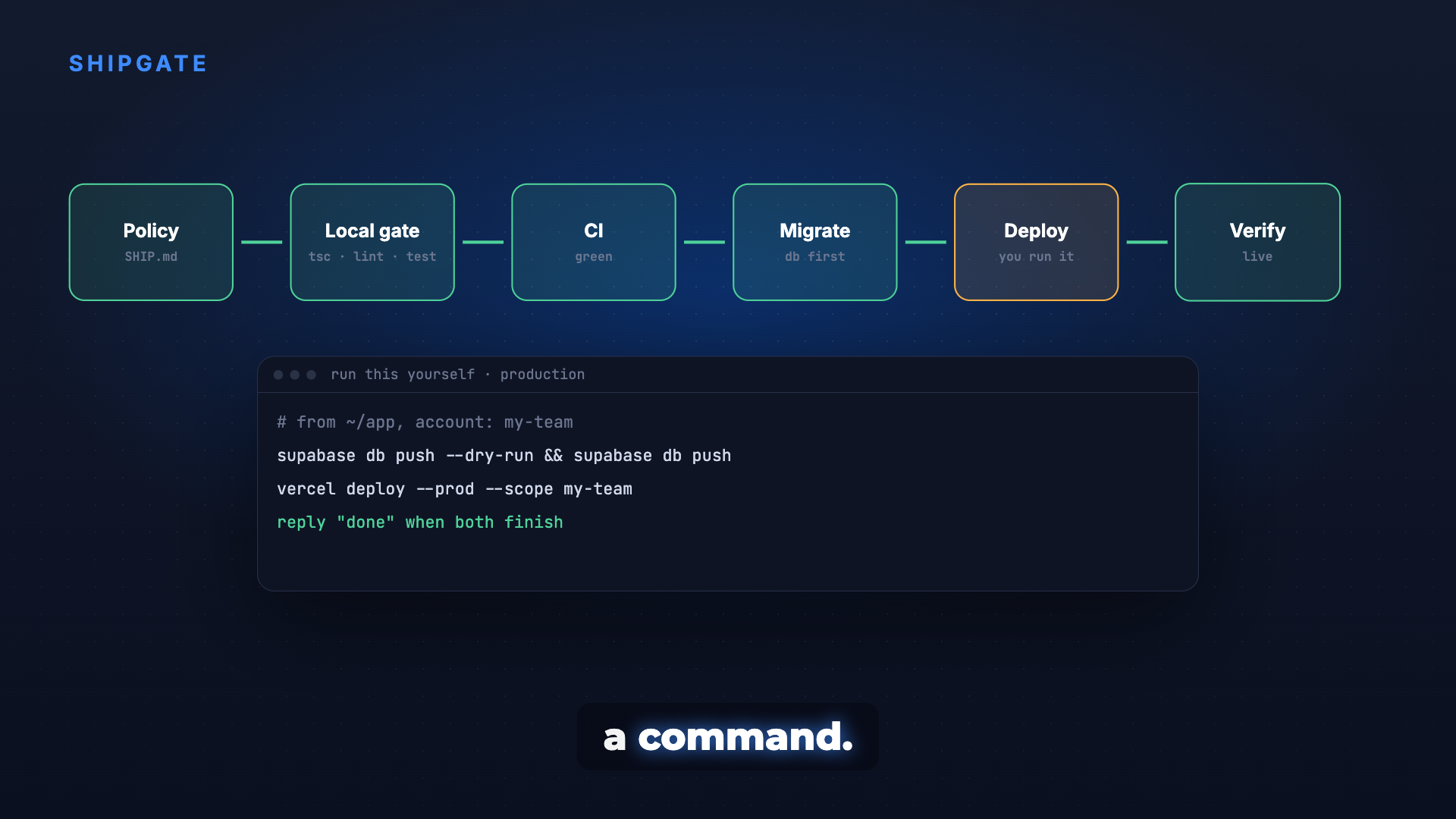
Ship from laptop to production in the right order: full gate, green CI, database before code, a human on every irreversible step, then verified live.
$12

Shipgate
Example session with this skill installed
I've finished the new auth flow locally. Ship this to production.
- Read your context and instructions
- Compiled the shipgate
Read SHIP.md first: this repo ships through a PR, never a push to main, and production steps are run by you. The auth flow is on its own worktree and branch, auth-flow.
| Step | Status | Notes |
|---|---|---|
| Ship policy | Read | PR to main, production steps by the owner |
| Local gate | Pass | tsc --noEmit, lint, tests, pnpm build with a frozen lockfile |
| Staged diff | Clean | file list reviewed, secret scan found nothing |
| PR #42 | CI green | waiting for your "merge" |
| Migration | Ready | 0042_user_metadata.sql applied to local and test, suite green |
| Production | Your turn | commands below, database first |
After you say "merge": run these yourself, in order
# from the repo root, account: my-team
supabase db dump -f backup-$(date +%F).sql     # backup first
supabase db push --dry-run                      # lists 0042_user_metadata only
supabase db push
vercel deploy --prod --scope my-team
Secrets stay in your terminal or host settings, never in this chat. Reply "done" when the deploy finishes.
What I check after "done"
vercel inspect: the production URL points at the NEW deployment id/api/healthreturns 200,/adminreturns 401, not 500- the served JS chunk contains a string from this change
- a read-only Playwright smoke test of sign-in on a phone viewport
Then I record the new deployment id, the previous one as the rollback target, and the migration applied, in SHIP.md.
Next steps
- Review PR #42 and reply "merge".
- Run the four commands above.
- Reply "done" for the live checks and the record.
Connects securely to your tools. The creator never sees your data.
About this skill
"Deploy to prod" is where agents do the most damage: a push to main, an app deployed before its migration, a secret pasted into chat, or a green dashboard that is still serving the old build. Ask your agent to "ship this" and Shipgate moves the change through every gate in order, hands the irreversible production steps to you as copy-ready commands, then proves the new version is live and records how to roll it back.
Why it's different
- A human on every irreversible step: production database push, production deploy, secrets and production SQL come to you as exact commands with the working directory and account scope. Secrets go into your own terminal, never into chat.
- Database before code: migrations are committed, dry-run and applied before the deploy, with a backup first.
- Verified, not assumed: confirms the URL serves the new deployment, checks status codes, greps the served bundle for this change and runs a read-only smoke test.
- Built from real projects: 23 failures that actually happened, each with its guard.
What it does
- Ship policy first: reads the repo's own rules (local-only, never push main, auto-push) and defaults to local-only when there are none.
- Local gate: typecheck, lint, tests and a production build with a frozen lockfile.
- PR with green CI: conventional commit, PR, CI watched until green, merge only on your explicit "merge".
- Go-live and lockdown: route audit for missing auth, row-level security, deployment protection, firewall and rate limits on first launch.
- Record and learn: deployment id and rollback target written down, and a blameless post-mortem only when something broke and you say yes.
How it works
- Read the ship policy and work in one worktree per task.
- Run the local gate and stage on purpose, with a secret scan of the diff.
- Open the PR and wait for green CI.
- Migrate, then deploy: gated steps handed to you as copy-ready commands or one go-live script.
- Verify live, lock down, record the deployment id and rollback target.
Frameworks & tools
Git, GitHub CLI and Actions, any Node package manager, Vercel or Fly.io, Supabase or another Postgres with migrations, curl and Playwright for the live checks.
Use cases
- Shipping a finished change from local to production without skipping steps.
- Getting a schema migration to production safely.
- First go-live of an app on a new host.
- Working out why a deploy failed or the site went down right after a release.
Known limitations
It does not run irreversible production commands for you; you paste them. Not for repos under a deploy freeze or client repos you may only pull from.
How to use
Skills on Agensi run inside your AI agent. Copy the prompt, paste it into your agent, and it connects to Agensi and installs this skill for you. If a payment is needed, your agent shows it to you first.
Reviews
No reviews yet
Be one of the first to try it. Every listed skill passes our trust checks below.
Security scanned
Passed our 8-point scan before listing
Fresh listing
Recently published to Agensi
Money-back guarantee
Doesn't do what its page promises? You get your money back.
Trust & safety
Security scanned
Verified clean today
- Passed all security checks, Safe to install
Requires
 Git
Git