More screenshots
Works with the AI Agents you already use
 Claude Code
 Cursor
 Codex CLI
 DeepSeek
 Muse+22 moreClaude CodeCursorCodex CLIDeepSeekMuse
 Dots
 Manus
 Grok
 Grok Bot+18 agents
Session Replay for Claude Code
Turn any Claude Code session into an offline HTML replay: every prompt, subagent and swarm on a map and a timeline, with start and finish times and token counts.
Free

Session Replay for Claude Code
Example session with this skill installed
Replay the session where we ran the sorting-algorithm swarm. I want a timeline of when each agent started and finished, and how many tokens they used.
- Read your context and instructions
- Compiled the session replay
- Generated the document
Here's the replay of your swarm session, "Set up a benchmark harness: random, sorted, reversed and nearly sorte…".
2 prompts, 11 subagents, 75 tool calls (1 failed), 2.0M tokens in, 76k out.
| Agent | Started | Finished | Took | Tool calls | Tokens in / out |
|---|---|---|---|---|---|
| Main agent, prompt 1 | 11:55:57 | 11:57:10 | 1m 13s | 6 | 185k / 7k |
| Main agent, prompt 2 | 12:13:57 | still running | 50m 12s | 12 | – (counted when it stops) |
| E1 Quicksort | 12:14:44 | 12:44:44 | 30m 00s | 8 | 270k / 8k |
| E2 Merge sort | 12:14:51 | 12:52:51 | 38m 00s | 8 | 290k / 15k |
| E3 Timsort | 12:14:58 | 12:38:58 | 24m 00s | 8 | 178k / 6k |
| E4 Radix sort | 12:15:05 | 12:59:05 | 44m 00s | 9 | 294k / 14k |
| C3 Measurer E03_timsort | 12:39:23 | 12:45:18 | 5m 55s | 3 | 122k / 3k |
| C3 Measurer E01_quicksort | 12:45:09 | 12:50:14 | 5m 05s | 3 | 86k / 4k |
| C4 Fact-check E03_timsort | 12:45:38 | 12:50:09 | 4m 31s | 4 | 176k / 4k |
| C4 Fact-check E01_quicksort | 12:50:34 | 12:56:13 | 5m 39s | 4 | 204k / 3k |
| C3 Measurer E02_merge | 12:53:16 | 12:57:50 | 4m 34s | 3 | 93k / 6k |
| C4 Fact-check E02_merge | 12:58:10 | 13:04:09 | 6m 00s | 4 | 111k / 6k |
| C3 Measurer E04_radix | 12:59:30 | still running | 4m 39s | 3 | – (counted when it stops) |
What stands out
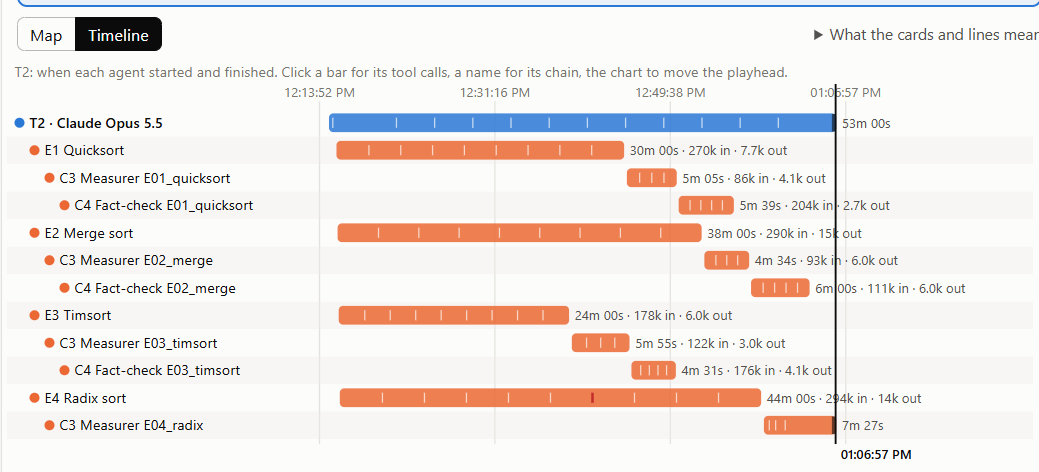
- The four explorers ran in parallel, all starting within 21 seconds (12:14:44 to 12:15:05).
- E4 Radix sort was the slowest and the hungriest: 44 minutes and 294k tokens in. Its measurer is still running.
- Each explorer handed over to a measurer, then a fact-checker, within a minute of finishing; the timsort chain finished first.
- 1 tool call failed; the replay marks it in red on the timeline.
Your replay: /home/sam/code/algo-lab/session-replay-2026-11-09-demo-sor.html
One file, opens offline in any browser:
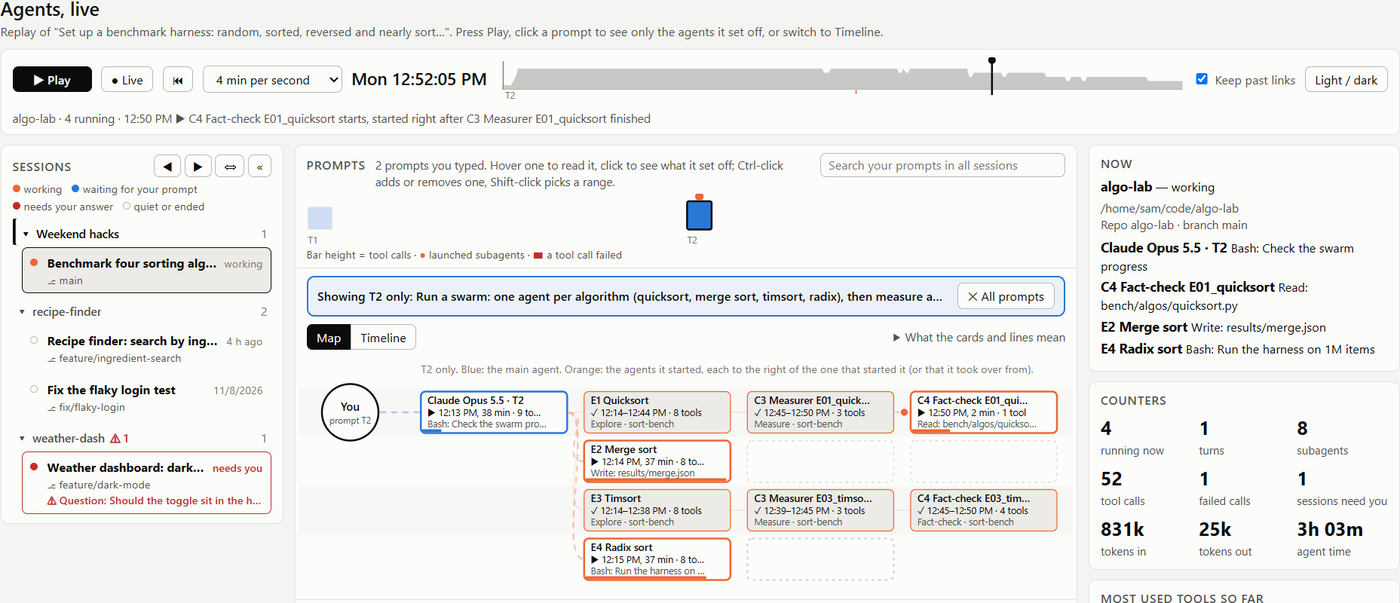
Map: who started whom, with the main agent in blue and every subagent in orange. Press Play to watch the swarm unfold.
- Timeline: one bar per agent from start to finish, with a tick for each tool call and red for failures.
- Story: each agent's task, tools, tokens and report, in order.
Next steps
- Want me to open it in your browser?
- I can replay another session too; say which one, or I'll list them.
- If you share the file, read it first: it contains your prompts and the agents' reports.
session-replay-2026-11-09-demo-sor.html
PDF · document
Example file from a real run - the skill writes it into your workspace.
Connects securely to your tools. The creator never sees your data.
About this skill
Ever wondered what actually happened while Claude Code was working? One prompt can start five subagents, a code reviewer and a whole workflow swarm, and the chat only shows you the summary.
Session Replay turns a Claude Code session into a single HTML file you can open in any browser, replay like a video, and send to a colleague. Just ask: "replay my last session" or "show me a timeline of what the agents did".
What you see
- Every prompt you typed, plus the questions Claude asked back and what you answered.
- The map: the main agent in blue, and every subagent and workflow agent it started in orange, each linked to whoever started it. Swarm agents show their own names and phases.
- The timeline: one bar per agent, from when it started to when it finished, with a tick for every tool call and red marks where something failed. Like a Gantt chart for your agents.
- Times and tokens: start and finish times, durations, tool calls and token counts (input, cache and output) per agent and per prompt.
- Replay controls: play, pause and scrub through the session as it happened. Click a prompt to see only the agents it set off.
How it works
The skill runs a small Node.js script (no packages) that reads the chosen session's transcript, which Claude Code already keeps on your computer, and writes one HTML file. Use --list to pick an older session by its first prompt.
Private by design
- Reads only the selected project's own Claude Code transcripts. Nothing else.
- No network calls, nothing installed, no settings changed.
- Keeps only tool names and one-line summaries, never file contents or command output.
- Anything that looks like a secret (tokens, passwords, API keys, URL query strings) is masked as
***.
Requirements: Claude Code and Node.js 18 or newer.
Want it live? This skill replays a session on request. For a page that follows all your sessions in real time, with alerts when one needs your input, get the free Agent Monitor plugin: https://github.com/omer-parvez/claude-agent-monitor
Find more skills like this on the Claude Skills Marketplace, the Codex Skills Marketplace and the Gemini Skills Marketplace, or browse Claude Skills for Agents & Orchestration.
Requires Node.js 18+. Limited to Claude Code project transcripts. Masks secrets and truncates text to 300 characters.
How to use
- 1
Connect your agent to the Agensi MCP
Copy the prompt and paste it into Claude, ChatGPT, Cursor or any agent that supports MCP. It sets up the connection for you. Manual setup
- 2
Sign in to Agensi
Your agent shows a sign-in link. Sign in and click Allow.
- 3
Ask for what you need
Your agent loads this skill and uses it on your task. It always asks before buying a skill.
Reviews
No reviews yet
Be one of the first to try it. Every listed skill goes through the trust checks below.
Security scanned
Checked by our 8-point scan before listing
Fresh listing
Recently published to Agensi
Free to use
No account required to browse
Trust & safety
Security scan
Security scan passed 7 days ago
- Free with an Agensi account
- Software
- Claude Code
Node.js 18+
Reads only the chosen project's Claude Code transcripts (~/.claude/projects/) and writes one HTML file. No network, no packages. Run it from the project folder you used Claude Code in, or pass --project folder . The file includes your prompts.
Permissions
Allowed Hosts