Works with the AI Agents you already use
 Claude Code
 Cursor
 Codex CLI
 Muse
Muse Dots+22 moreClaude CodeCursorCodex CLIMuseDots
 OpenClaw
 Manus
Manus Grok
Grok Grok Bot+18 agents
QR Code Maker
Turn any text or URL into a scannable, printable QR code. Your agent writes a ready-to-open HTML file with your code already rendered, plus live preview, error correction controls, and PNG and SVG downloads.
$3.99

QR Code Maker
Example session with this skill installed
Make a QR code for https://agensi.io so I can print it on a flyer.
- Read your context and instructions
- Compiled the qr code maker
- Generated the image
Your QR code is ready. The file qr-agensi.html contains a scannable code for https://agensi.io, rendered the moment it opens, with PNG and SVG downloads built in for your flyer.
Deliverable
qr-agensi.html is written and ready to open. It is fully self-contained: the complete QR encoder ships inside the file, so it works offline in any browser with no network requests and no accounts. The page shows the live code, keeps the text editable if you want to tweak the payload later, and offers error correction controls plus the two downloads.
Rendered code
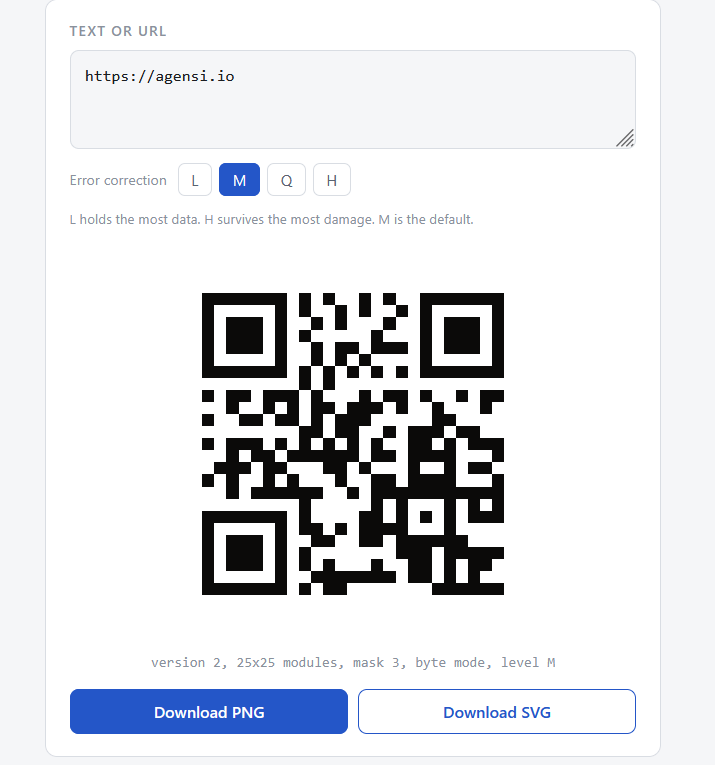
The image shows the generated file open in a browser: the code rendered, the stats line beneath it, and the download buttons.
QR details
| Property | Value |
|---|---|
| Payload | https://agensi.io |
| Mode | Byte |
| Version | 2 |
| Matrix | 25 x 25 modules |
| Mask | 3 |
| Error correction | Level M (balanced) |
Verification
The encoder output was verified end to end: generated matrices were decoded back through an independent read path, with the format information validated, every Reed-Solomon block checked, and the payload recovered exactly. The same verification covered URL, text, Wi-Fi, numeric, alphanumeric, and non-ASCII test cases.
Next steps for the flyer
Use the SVG download from the page. It is vector, so it scales to any print size without softening, and it carries the standard four-module quiet zone scanners expect. The PNG download renders at roughly 1600 pixels, which suits small prints and screens. If the flyer will hang outdoors or on a rough surface, say the word and I will re-render it at level H for extra damage tolerance.
qr-agensi.html
PNG · 1536×1024
Example file from a real run - the skill writes it into your workspace.
Connects securely to your tools. The creator never sees your data.
About this skill
Turn any text or URL into a scannable, printable QR code in one step. Ask your agent for a QR code and you get a finished file: the code renders the moment it opens, with live preview, editable text, error correction controls, and PNG plus SVG downloads built in.
What your agent does
Give it a link, a message, a Wi-Fi login string, or any text. It places your payload into a bundled HTML template and writes a ready file such as qr-flyer-link.html. Open it in any browser and your QR code is already rendered. Edit the text on the page and the code re-renders instantly, so you can tweak the payload any time without starting over.
What you get
- Fully offline generation. The complete QR encoder ships inside the skill, so nothing is sent to any server. There are no accounts and no rate limits, and your text never leaves your machine.
- Real error correction control. Levels L, M, Q, and H with the tradeoffs spelled out. Codes headed for rough environments or small prints get the damage tolerance they need.
- Print quality by default. The SVG download is vector and scales to any size without softening. The PNG renders at roughly 1600 pixels. Both carry the standard four-module quiet zone scanners expect.
- Any content. URLs, plain text, Wi-Fi strings, numbers up to 7089 digits, and UTF-8 text including accents and emoji.
- Verified output. The encoder was checked by decoding generated matrices back through an independent path. Format information validated, every Reed-Solomon block checked, and the payload recovered exactly across text, URL, Wi-Fi, numeric, alphanumeric, and non-ASCII cases.
What is inside
A complete QR implementation: versions 1 to 40, numeric, alphanumeric, and byte modes, Reed-Solomon error correction at all four levels, and standard mask optimization. The capacity ceiling at level L is 7089 digits, 4296 letters and common symbols, or 2953 bytes of any text.
How to use
Skills on Agensi run inside your AI agent. Copy the prompt, paste it into your agent, and it connects to Agensi and installs this skill for you. If a payment is needed, your agent shows it to you first.
Reviews
No reviews yet
Be one of the first to try it. Every listed skill passes our trust checks below.
Security scanned
Passed our 8-point scan before listing
Fresh listing
Recently published to Agensi
Money-back guarantee
Doesn't do what its page promises? You get your money back.
Trust & safety
Security scanned
Verified clean 3 days ago
- Passed all security checks, Safe to install