More screenshots
Works with the AI Agents you already use
 Claude Code
 Cursor
 Codex CLI
 Muse
Muse Dots+22 moreClaude CodeCursorCodex CLIMuseDots
 OpenClaw
 Manus
Manus Grok
Grok Grok Bot+18 agents
Pocketship
Turn your Next.js app into an installable PWA that feels native on the phone, works offline and never caches private data.
$12

Pocketship
Example session with this skill installed
Add PWA support to my Next.js 16 app. I use Turbopack and need to make sure the /dashboard and /settings routes never get cached for offline security.
- Read your context and instructions
- Compiled the pocketship
- Generated the UI component
Your app builds with Turbopack (Next.js 16 default), so I used @serwist/turbopack; @serwist/next is a webpack plugin and would produce no sw.js here. Every package was checked on npm first.
| File | What it does |
|---|---|
app/manifest.ts | standalone display, brand colours, 192 and 512 icons plus a separate maskable icon |
app/sw.ts | private routes and other hosts are network-only before defaultCache |
app/serwist/[path]/route.ts | serves the worker under Turbopack, precaches /~offline |
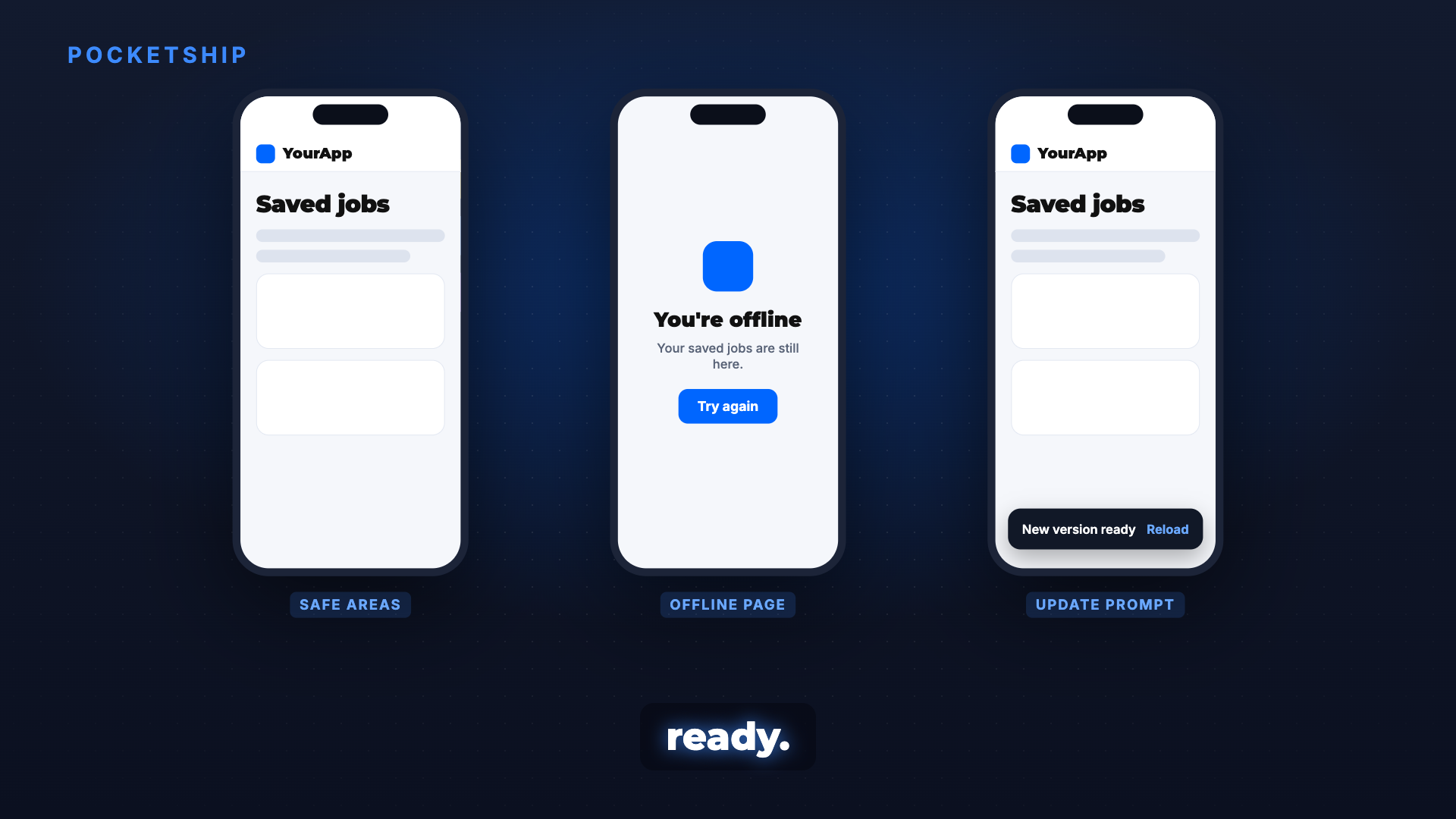
app/~offline/page.tsx | static offline page with a "Try again" button |
components/UpdateToast.tsx | "New version ready, Reload" instead of a silent swap |
// app/sw.ts
import { defaultCache } from '@serwist/turbopack/worker'
import { NetworkOnly, Serwist, type PrecacheEntry, type RuntimeCaching, type SerwistGlobalConfig } from 'serwist'
declare global { interface WorkerGlobalScope extends SerwistGlobalConfig { __SW_MANIFEST: (PrecacheEntry | string)[] | undefined } }
declare const self: ServiceWorkerGlobalScope
const PRIVATE = /^\/(api|dashboard|settings)(\/|$)/ // every signed-in prefix
const privateFirst: RuntimeCaching[] = [
  { matcher: ({ url, sameOrigin }) => sameOrigin && PRIVATE.test(url.pathname), handler: new NetworkOnly() },
  { matcher: ({ sameOrigin }) => !sameOrigin, handler: new NetworkOnly() }, // auth, database and payment hosts
]
const serwist = new Serwist({
  precacheEntries: self.__SW_MANIFEST, skipWaiting: false, clientsClaim: true, navigationPreload: true,
  runtimeCaching: [...privateFirst, ...defaultCache],
  fallbacks: { entries: [{ url: '/~offline', matcher: ({ request }) => request.destination === 'document' }] },
})
serwist.addEventListeners()
defaultCache alone would keep /api/* GETs for 24 hours and every cross-origin GET for an hour, so the two network-only rules come first. Caches are cleared on sign-out.
Next steps
next build && next start, then check DevTools Application: manifest has no errors, and Cache Storage holds no/dashboard,/settingsor/apiresponses while signed in.- Install on one Android phone and one iPhone: standalone, safe areas, no input zoom, offline page in airplane mode.
- Deploy a second time and confirm the update toast appears.
page.tsx
TSX · React component
Example file from a real run - the skill writes it into your workspace.
Connects securely to your tools. The creator never sees your data.
About this skill
Your web app works, but on the phone it opens in a browser tab, zooms into every input, shows a blank screen offline, and users keep seeing last week's version after you deploy. Ask your agent to "make it a PWA" and Pocketship makes your Next.js App Router app install to the home screen, open full screen, show a proper offline page and tell people when a new version is ready, then checks it on a real phone.
Why it's different
- Private data stays off the disk: signed-in pages, API calls and other hosts are network-only before any default caching, so one user's data is never served from cache.
- Matched to your bundler: picks the right Serwist mode for Turbopack or webpack and verifies every package on npm first, so no dead or invented plugins.
- Feels native, not just installable: safe areas,
100dvh, 16px inputs, no tap flash or scroll bounce, and an install prompt only after the user got value. - Built from real projects: 10 failures that actually happened, each with its guard.
What it does
- Manifest and icons:
app/manifest.ts, 192 and 512 icons plus a separate maskable icon, Apple touch icon, theme colour per light and dark scheme. - Service worker: Serwist with private routes first, a precached offline page, and
sw.jsserved with no-store. - Update prompt: a small "New version ready" toast instead of a silent swap or a stuck old build.
- iOS fixes: safe-area padding, dynamic viewport height, no input zoom, standalone detection.
- Install prompt:
beforeinstallprompton Chromium, a one-time "Add to Home Screen" sheet on iOS, no re-ask for 30 days.
How it works
- Check versions and bundler: Next.js version, Turbopack or webpack, and every package checked on npm.
- Manifest, icons and theme colour from your brand tokens.
- Service worker and offline page with private routes excluded first.
- Update and install prompts wired to the right moments.
- Real-device check: DevTools Application panel, Lighthouse, then install on one Android and one iPhone.
Frameworks & tools
Next.js 15 or 16 App Router, Serwist (@serwist/next, @serwist/turbopack or @serwist/cli), Chrome DevTools and Lighthouse, plus one Android phone and one iPhone for the final check.
Use cases
- A mobile-first web app that should live on the home screen without an app store.
- Users stuck on an old version after every deploy.
- An app that must survive a flaky connection with a clear offline page.
- Making a web app feel native: no grey tap flash, no bounce, no zoom on inputs.
Known limitations
Built for Next.js App Router; other frameworks need adapting. Not for native app-store builds. Push notifications are a variant, and on iOS they only reach home-screen installs.
How to use
Skills on Agensi run inside your AI agent. Copy the prompt, paste it into your agent, and it connects to Agensi and installs this skill for you. If a payment is needed, your agent shows it to you first.
Reviews
No reviews yet
Be one of the first to try it. Every listed skill passes our trust checks below.
Security scanned
Passed our 8-point scan before listing
Fresh listing
Recently published to Agensi
Money-back guarantee
Doesn't do what its page promises? You get your money back.
Trust & safety
Security scanned
Verified clean today
- Passed all security checks, Safe to install
Requires
 Node.js