Works with the AI Agents you already use
 Claude Code
 Cursor
 Codex CLI
 DeepSeek
 Muse+22 moreClaude CodeCursorCodex CLIDeepSeekMuse
 Dots
 Manus
 Grok
 Grok Bot+18 agents
pixel-3d Pro: Make 3D Look Like Hand-Drawn Pixel Art
27 techniques that make a real-time 3D scene read as hand-drawn pixel art, plus 3D-to-sprite tools. Tested Three.js module; recipes verified in Godot 4 and Unity 6 URP.
$25
pixel-3d Pro: Make 3D Look Like Hand-Drawn Pixel Art
Example session with this skill installed
My Three.js game (top-down, orthographic camera) looks like generic low-poly 3D. Make it read as pixel art: 4-px pixels, 1-px outlines, 3-band toon lighting, a palette taken from the scene with dithering that doesn't crawl when the camera moves, and no shimmering when the player walks.
- Read your context and instructions
- Compiled the pixel-3d pro
- Generated the UI component
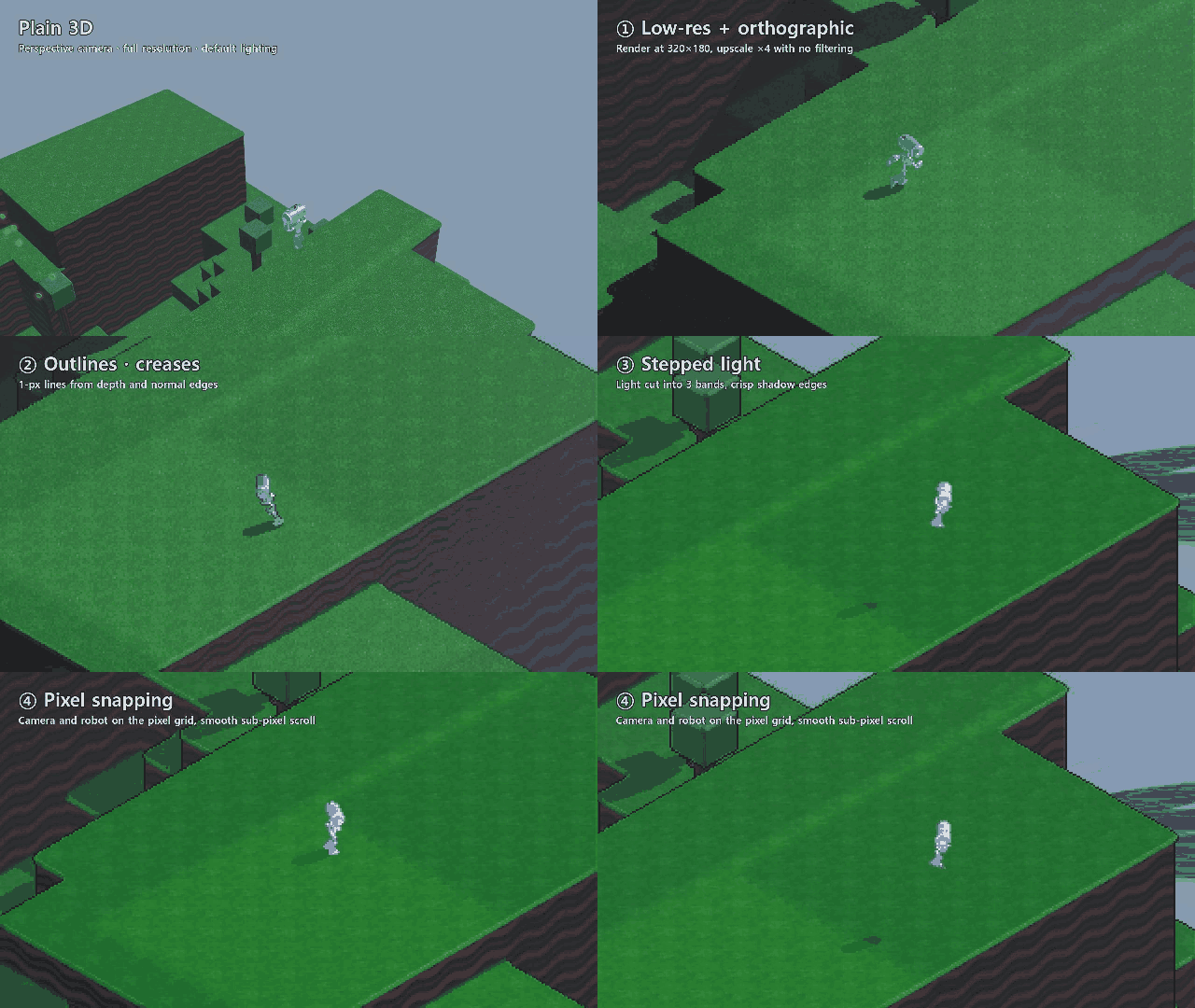
Your scene now renders through PixelRenderer at 4-px pixels, with outlines, creases, 3-band toon materials, an auto palette and world-locked dithering. Camera and player snap to the pixel grid, and sub-pixel scrolling keeps the pan smooth.
What changed
| # | Technique | Setting |
|---|---|---|
| 1 | Low-res render, no filtering | pixelSize: 4 |
| 2–3 | Outlines + creases | outline: true, creases: true |
| 4 | Stepped light | createToonMaterial({ steps: 3 }) on every mesh |
| 6 | Pixel snapping + sub-pixel scroll | snapCamera, snapObjects, subPixelScroll (on by default) |
| 10 | Auto palette + dither | capturePalette() once, dither = 0.5 |
Code (src/main.js)
import { PixelRenderer, createToonMaterial } from './pixel3d.js';

const pixel = new PixelRenderer(renderer, { pixelSize: 4 });

// 4: stepped light on every mesh, keeping each colour and texture
scene.traverse((o) => {
  if (o.isMesh) o.material = createToonMaterial({
    color: o.material.color, map: o.material.map, steps: 3,
  });
});

// 6: snap the player to the pixel grid as well
player.userData.pixelSnap = true;

// 10: palette taken from what the scene looks like, then world-locked dither
pixel.capturePalette(scene, camera, { colors: 24 });
pixel.dither = 0.5;

function frame() {
  pixel.render(scene, camera);   // replaces renderer.render(scene, camera)
  requestAnimationFrame(frame);
}
frame();
Checked
I took screenshots with each technique on and off: outlines appear on every silhouette, shading falls into 3 bands, and the dither pattern stays on the ground while the camera pans instead of crawling across the screen.
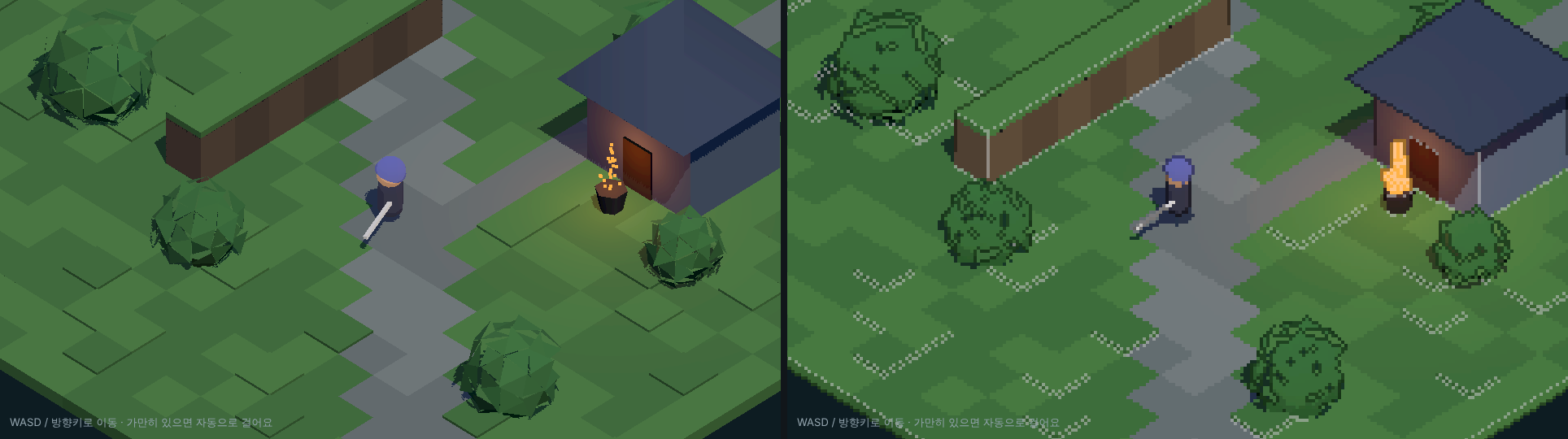
Next steps
- Lumpy meshes (bushes, heads):
sphericalizeNormals(geometry, 0.85)for clean blocks of light. - Characters turning:
quantizeAngle(facing, 8)for sprite-like 8-direction rotation. - Re-run
capturePalette()when the area or time of day changes.
before-after.png
TSX · React component
Example file from a real run - the skill writes it into your workspace.
Connects securely to your tools. The creator never sees your data.
About this skill
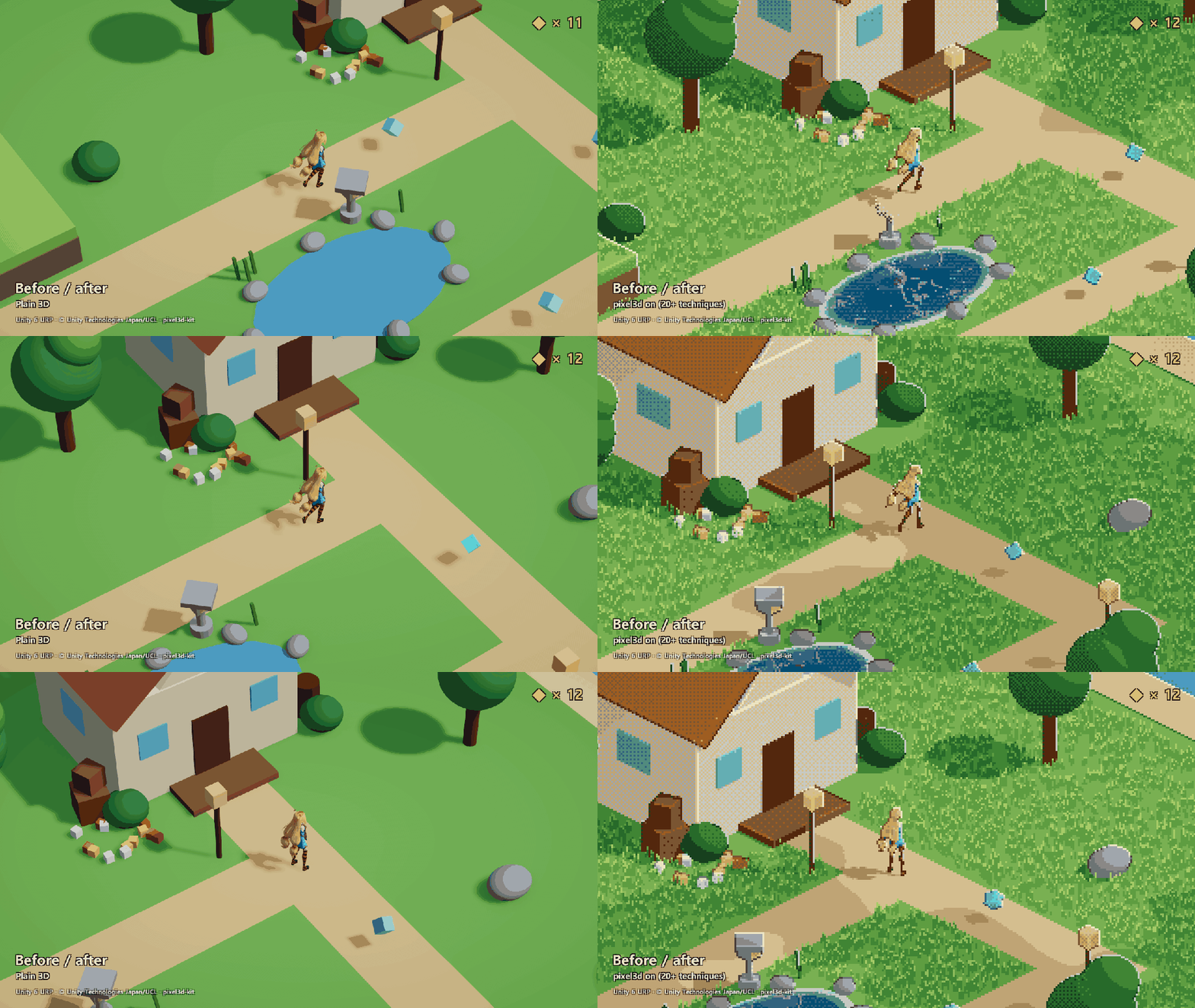
Rendering 3D at low resolution doesn't make pixel art. It makes blurry low-res 3D. This skill teaches your agent the full set of tricks behind "wait, that's 3D?" games, gives it working code to apply them to your project, and has it check the result with on/off screenshots.
Core (1–8)
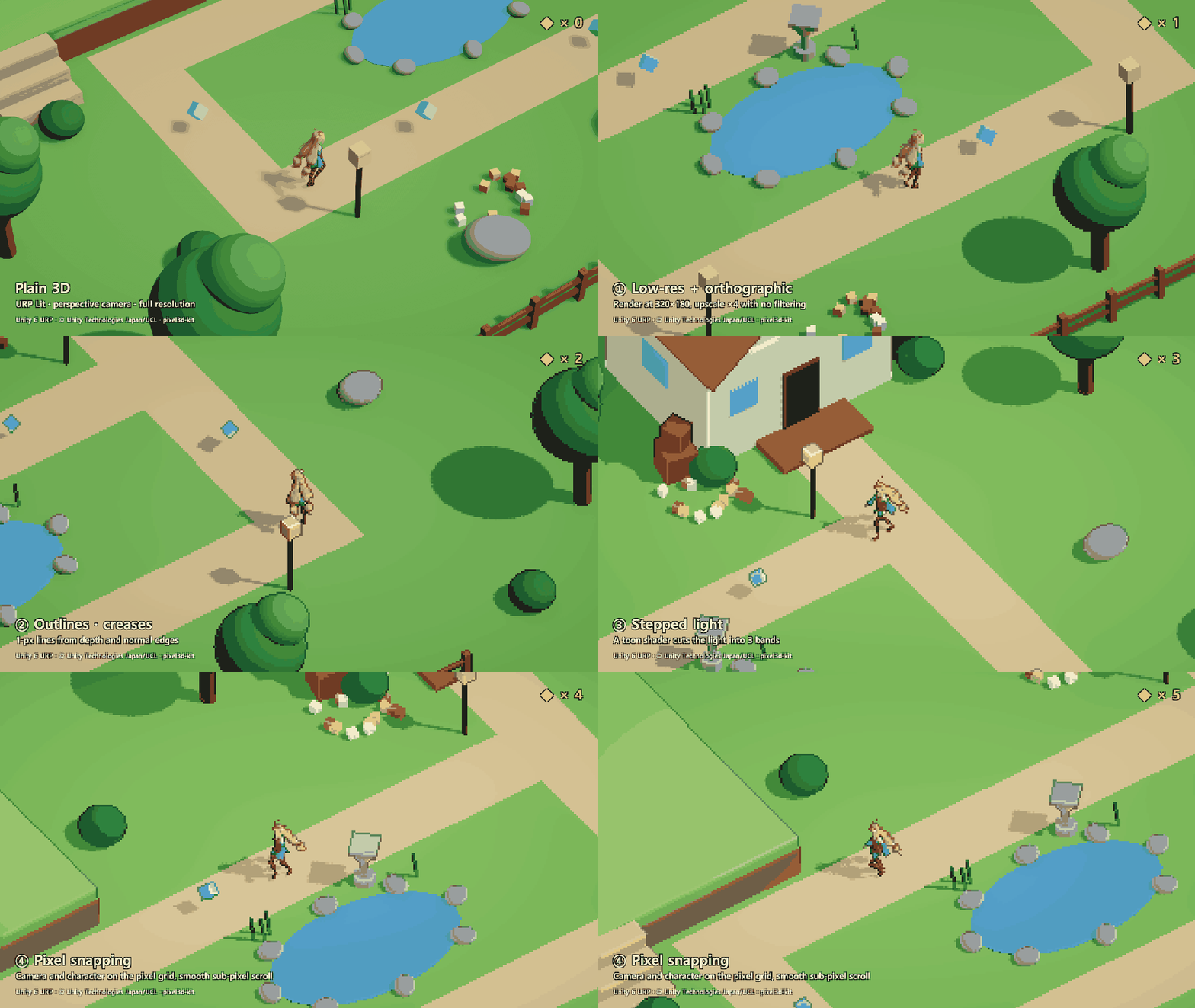
- Low-res render with nearest-neighbour upscale and an orthographic camera
- Crisp 1-px silhouette outlines from depth edges (2-px option, centred on the silhouette)
- Hand-drawn crease lines on convex folds, from normal edges
- Stepped toon lighting
- Edited normals and separate shadow-proxy shapes
- Pixel-grid snapping for the camera, objects and held items, with smooth sub-pixel scrolling
- Stepped 8-direction rotation, like sprite frames
- Sprite-like depth sorting: weapons stop clipping into walls
Pro (9–16) and v0.3 (17–27)
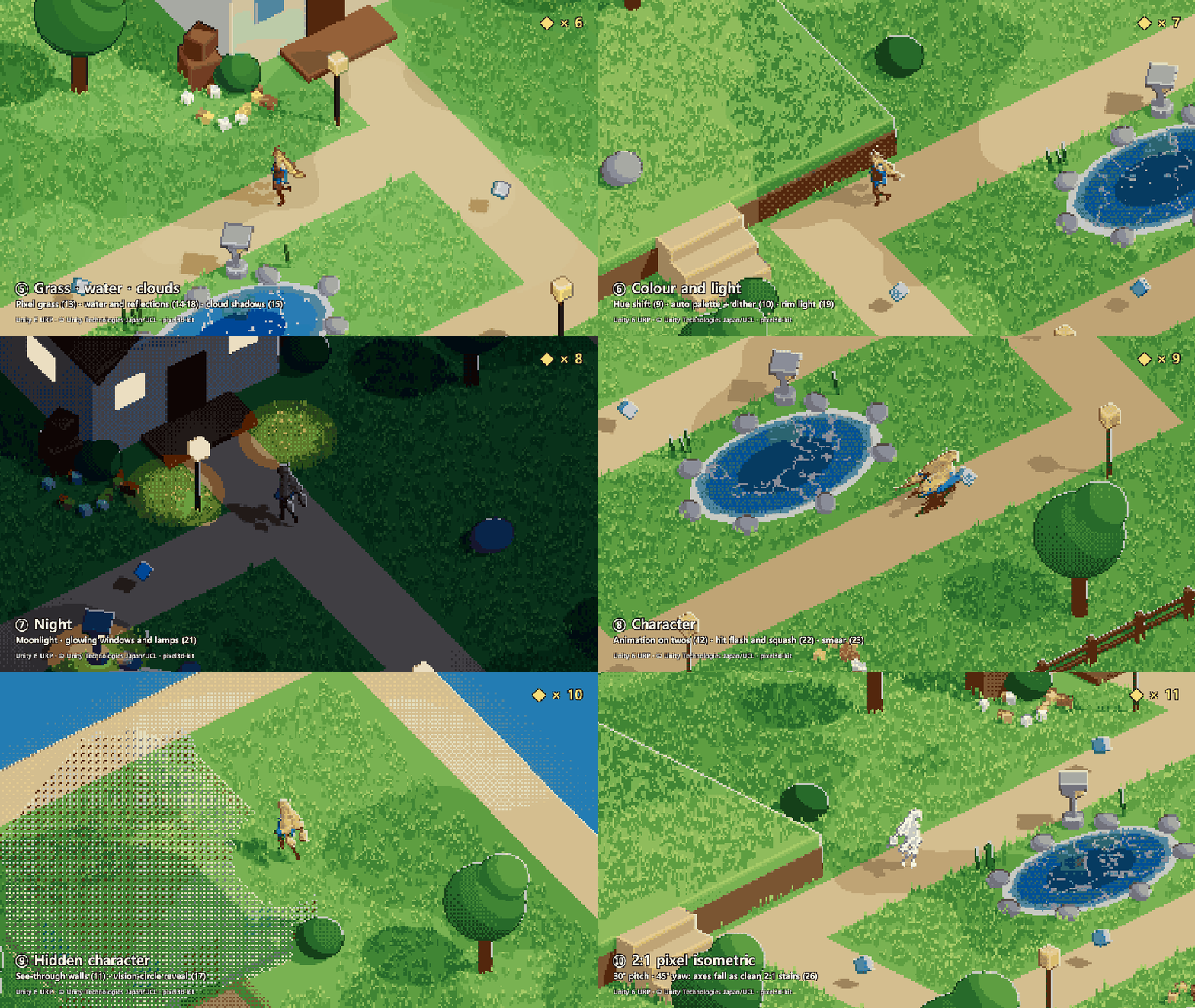
- Hue-shifted light: cool shadows, warm light, no loss of brightness
- Auto palette pulled from your own scene, with world-locked Bayer dithering that never crawls
- Dithered see-through: walls between the camera and the player dissolve into dots
- Animation on twos: 12 fps characters, effects and wind, with a full-frame-rate camera
- Pixel grass: wind-swayed, shaded like the ground, no outline noise
- Pixel water: banded depth colour, shoreline foam, grid-locked ripples and glints
- Drifting cloud shadows
- Sprite-sheet baker: any 3D model to an N-direction × M-frame PNG with a transparent background
- Vision-circle reveal: a dithered window through walls around the player
- Pixel reflections in water
- Rim light / selective outline (sel-out)
- Drifting, banded fog
- Night mode with glowing windows: one number from day to night
- Hit flash with squash and stretch
- Smear frames on fast motion
- Depth sprites: baked 2D sprites lit per pixel that intersect 3D per pixel
- Baking at your game's exact pixel scale, with tilts and a locked palette
- A 2:1 pixel isometric camera with clean staircase edges
- Sprite-stack slice export with filled cross-sections
Verified, not just written
- Three.js: rendered and screenshot-tested in Chromium (WebGL2), every technique on and off.
- Godot 4.7: techniques 1–6 run on the official Platformer 3D demo, recorded and measured frame by frame.
- Unity 6 URP: techniques 1–4, 6, 9–15, 17–19, 21–23 and 26 run in a top-down demo scene, recorded and measured frame by frame.
- Sections not yet run in an engine are marked as untested in the files.
What those runs taught is written into the recipes: sub-pixel scrolling is required (camera snapping alone makes the screen zig-zag), the character the camera follows must be snapped in screen space, and the engine pitfalls that bite (Godot physics interpolation on the camera, Unity UsePass casing and main-light attenuation in a custom toon shader) are called out where they happen.
What's inside
pixel3d.js: one ES module for three.js r150+ (WebGL2). Replacerenderer.renderwithpixel.render.demo.html: an interactive demo with an on/off switch for every technique.references/theory.md: the engine-agnostic math for every technique.references/godot.mdandreferences/unity.md: Godot 4 and Unity URP recipes with the shaders and scripts that were run in those editors.- A verification workflow: the agent screenshots each technique on and off and compares them.
Free edition
Techniques 1–8 are also available free under MIT as pixel3d-kit. Pro adds techniques 9–27, the sprite tools and the engine verification notes for them.
Network and safety
pixel3d.jsmakes no network calls and has no dependencies besides three.js.demo.htmlloads three.js 0.170.0 from the jsDelivr CDN through an import map. Point the import map at a local copy to run it offline.- No telemetry, no obfuscated code; everything is readable source.
Licence
Commercial licence, one per person: use it in your own games and apps, including commercial ones, with no royalties. No redistribution or resale of the skill or its code. Images you produce with it (sprite sheets, bakes) are yours.
Find more skills like this on the Claude Skills Marketplace, the Codex Skills Marketplace and the Gemini Skills Marketplace, or browse Claude Skills for Game Development.
- Built for orthographic cameras. Low-res rendering and outlines also work with perspective, but pixel snapping assumes an orthographic camera; with perspective the image will still swim.
- The Three.js module needs WebGL2. Custom ShaderMaterials need the snippets injected by hand (patchMaterial helps); built-in and toon materials are handled for you.
- Engine coverage: Godot recipes verified for techniques 1-6; Unity URP for 1-4, 6, 9-15, 17-19, 21-23 and 26. The other engine sections are ports of the same math, marked untested.
- The Unity and Godot example scripts are the demos' own directors, shipped as working references, not drop-in components; keep the camera, snapping and effect parts.
- In the Unity demo, water depth bands come from the distance to the pond's edge (the pond has no basin); real scene-depth thickness needs geometry under the water.
- Smear frames follow the whole object's velocity, so a limb swinging while the body stands still gets no smear.
- The look needs a scene made for it: realistic, high-frequency textures turn into pixel noise. Simple shapes and flat colours work best.
- The auto palette is taken from one frame; re-capture it when the area or time of day changes.
How to use
- 1
Connect your agent to the Agensi MCP
Copy the prompt and paste it into Claude, ChatGPT, Cursor or any agent that supports MCP. It sets up the connection for you. Manual setup
- 2
Sign in to Agensi
Your agent shows a sign-in link. Sign in and click Allow.
- 3
Ask for what you need
Your agent loads this skill and uses it on your task. It always asks before buying a skill.
Reviews
No reviews yet
Be one of the first to try it. Every listed skill goes through the trust checks below.
Security scanned
Checked by our 8-point scan before listing
Fresh listing
Recently published to Agensi
Money-back guarantee
Doesn't do what its page promises? You get your money back.
Trust & safety
Security scan
Security scan passed 8 days ago
- Accounts
Threejs
Godotengine
- Software
- three.js r150+WebGL2 browser
- Optional
- Godot 4.2+
Unity 2022.3+
orURP 14+Python 3
Godot and Unity (with URP 14+) are only for their recipes. Python only serves the demo page locally.
Permissions
Allowed Hosts
File Scopes
Shell, file read/write and browser are used to apply the techniques to the project's rendering code and to verify them with on/off screenshots of the running scene. Network access is only the demo page loading three.js 0.170.0 from the jsDelivr CDN through an import map; pixel3d.js itself makes no network calls. Point the import map at a local copy of three.js to run fully offline.