More screenshots
Works with the AI Agents you already use
 Claude Code
 Cursor
 Codex CLI
 Muse
Muse Dots+22 moreClaude CodeCursorCodex CLIMuseDots
 OpenClaw
 Manus
Manus Grok
Grok Grok Bot+18 agents
Photo Art Studio Pro
Turn photographs into distinctive framed art, editorial posters, keepsakes and layered scenes, with source-aware design and exact English or Chinese copy.
$9.99

Photo Art Studio Pro
Example session with this skill installed
Use Photo Art Studio Pro to turn my supplied coastal photograph into a calm contemporary keepsake. Keep the complete photo visible; do not repaint it, invent a location or date, or add people or objects. Make coordinated portrait editions at 1200 × 1600.
English title: Sea in Stillness
English caption: A moment worth keeping
Chinese title: 海边的静谧
Chinese caption: 把这一刻留住
Use an archival frame, a generous warm mat and a restrained footer. Deliver editable SVGs, an HTML review and a recipe/source record. Check the actual render and the exact wording.
- Read your context and instructions
- Compiled the photo art studio
- Generated the UI component
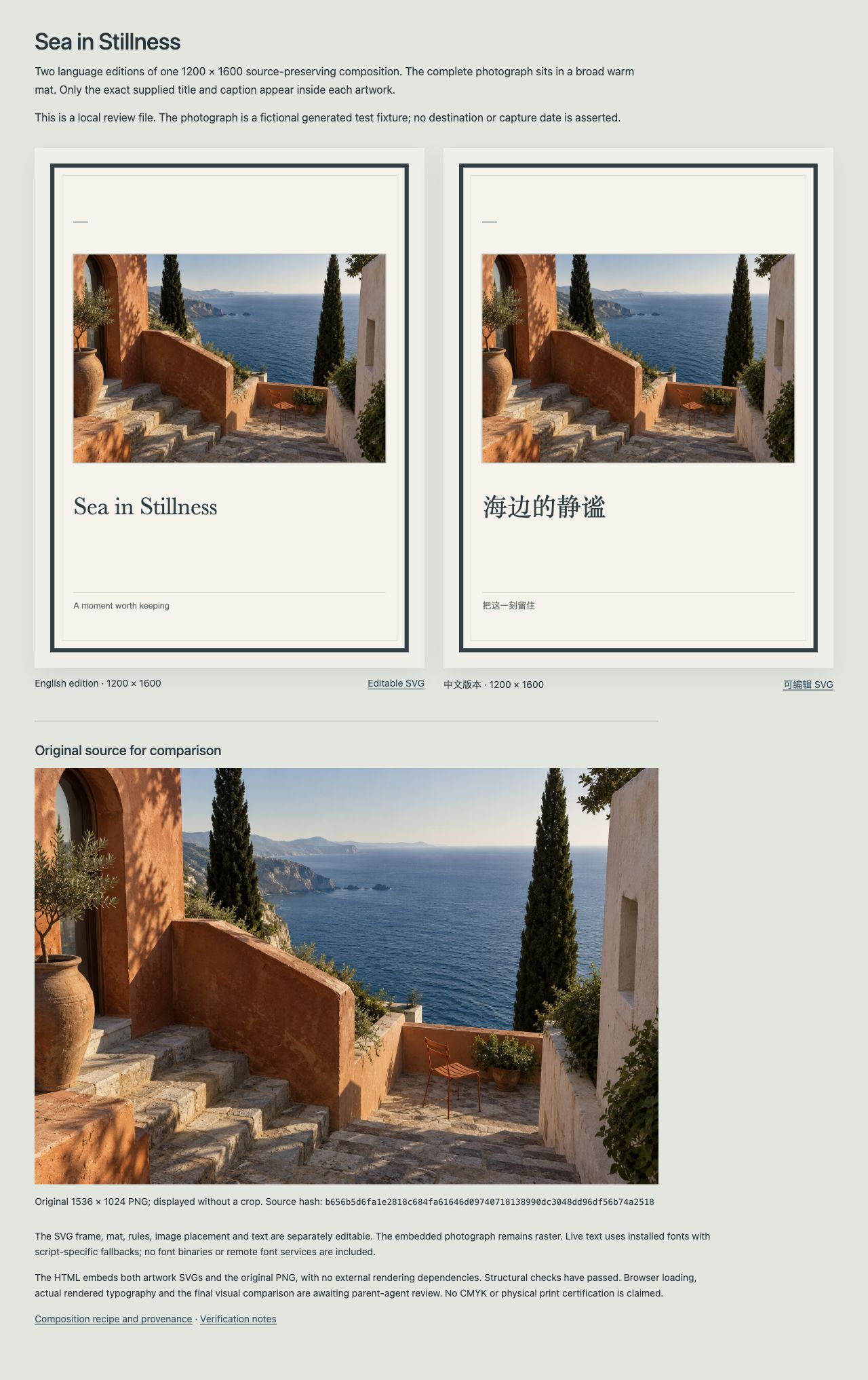
Sea in Stillness — two coordinated keepsakes
The complete supplied coastal picture is retained in both editions. The stone steps, chair, plants, tall trees, walls and sea remain source-derived. No scene details were repainted or added, and no location or capture date is asserted.
| Edition | Exact title | Exact caption | Canvas |
|---|---|---|---|
| English | Sea in Stillness | A moment worth keeping | 1200 × 1600 |
| Chinese | 海边的静谧 | 把这一刻留住 | 1200 × 1600 |
Delivered design
- A restrained charcoal frame, warm archival mat, fine rules and generous negative space.
- The entire 1536 × 1024 original picture placed at x=120, y=328, width=960, height=640. This is proportional scaling with no crop or stretch.
- Separate native layout geometry, live title/caption text and an embedded raster photograph.
- Two editable SVG editions, one HTML comparison/review, the composition recipe and source/provenance record. The original photograph remains available alongside the designed outputs.
Verification and handoff
The embedded original retained its SHA-256 source identity. Both files passed structural/XML and exact-copy checks. The actual 1280-pixel local browser review loaded the picture, showed all four supplied strings, retained the full source and had no horizontal overflow. The English and Chinese compositions were visually checked together.
The SVGs can be adjusted at the layout/text level; the photograph is raster. Host fonts are required for live text. External vector-editor portability, physical-print color/bleed specifications and offline execution have not been certified. This is an actual local creator example using a fictional generated source photograph, not a claim that Agensi buyer execution has been tested.
1792024301997-6vx3.jpg
TSX · React component
Example file from a real run - the skill writes it into your workspace.
Connects securely to your tools. The creator never sees your data.
About this skill
Make your photograph worth displaying
An expressive portrait. A favorite pet. A place you want to remember. A carefully photographed product. Photo Art Studio Pro guides your Agent from an original photograph to a considered visual object: its composition, medium, typography and details are chosen for that particular image.
Start with a photograph and an idea—or let your Agent propose a fitting direction. Keep the photograph recognizable in a quiet gallery frame, build a bold editorial poster around it, or intentionally reinterpret it as an artistic keepsake. You choose how much may change.
14 creative mode workflows
- Art framing: gallery mats, mounts and designed photo presentation.
- Editorial posters: photograph-led layouts with a clear typographic hierarchy.
- Artistic reinterpretation: translate a reference photo into another visual medium with an available image tool.
- Multi-photo collage: give authorized photographs distinct roles in a composed whole.
- Subject breakout: let an approved extracted subject cross designed frame geometry.
- Paper diorama: create a coherent paper-stage depth treatment.
- Material art and relief: explore simulated ceramic, enamel, carved or textile-like surfaces.
- Souvenir design: photo-led postcards, tickets, stamps, stickers or collectible concepts.
- Film and archive: contact sheets, film rhythms and photographic sequences.
- Photo typography: make exact words part of the image structure.
- Photographic finishing: intentional tonal, color and geometric treatment within the source contract.
- Creative scene reshape: deliberately reinterpret a setting, with generated changes identified.
- Series and photobooks: plan coordinated covers, pages and image sequences.
- Scene display and interaction: compose a gallery or purposeful interactive photo scene with a complete static view.
These are adaptable production workflows, not fourteen fixed filters. Some routes need image generation, extraction, multiple photographs or interactive rendering capabilities.
A broader creative vocabulary
The Skill includes 20 art-direction guides and 24 occasion recipes. Explore quiet museum framing, fashion editorial, cinema contact sheets, risograph memory, woodcut-inspired prints, watercolor, ceramic relief, woven treatments and living scenes. Apply them to portraits, pets, travel, architecture, products, celebrations, gifts and collections.
Modes define the object. Art directions define its visual language. Occasions define its purpose. Your Agent can combine appropriate choices or originate another direction. The counts describe written guidance, not 20 or 24 completed templates or an exhaustively tested combination library.
Designed around the original
- Choose source-preserving composition, intentional finishing or artistic reinterpretation explicitly.
- Protect important faces, hands, product details and relationships when planning crops.
- Keep supplied names, dates, titles and captions in an exact-text ledger; do not invent facts from appearance.
- Create finished copy in English, Chinese or bilingual form, using English Skill instructions.
- Check the actual rendered result against the source and brief before delivery.
- Describe generated details and simulated materials honestly. Generated extraction or painting is not a guarantee of identical identity or pixels.
Inputs and possible outputs
Provide your authorized photograph or photo collection, intended use, exact wording and any elements that must stay recognizable. Add a preferred size or direction if you have one; an unspecified decorative preference need not prevent a suitable design proposal.
The native layout route can produce finished PNG, source-aware SVG, editable HTML and a layout/recipe record when the Agent's environment supports their creation and rendering. These four formats were demonstrated in local creator tests. A photograph or generated painting embedded in SVG remains raster artwork; an editable layout does not make its painted detail vector-editable.
Other requested formats, complete books, physical print specifications and interactive behavior depend on the tools and actual work performed. No universal PDF/JPEG exporter, print-production certification or complete photobook generator is included.
What you are buying and what you need
This is an Agent Skill, consisting of original English instructions: a concise core, ten conditional references and Agent metadata, twelve text files in total. It guides your Agent's creative decisions, production and verification. It is not a seller-hosted image service or a bundled photo-editing application.
Use an Agent environment with image inspection and suitable creation/rendering tools. Native composition uses HTML/SVG/Canvas capabilities. Artistic edits, custom cutouts and scene generation require an available image-generation/editing tool; your Agent must follow that tool's requirements. No particular provider or seller backend is mandatory. Provider access, charges and usage rights depend on your own environment and account; generation is not promised to be free or unlimited.
The gallery images illustrate local creator work using fictional generated source photos and prepared derivatives. They are examples, not a live generator for arbitrary uploads or a promise that a demo application, image library or font binaries are supplied to buyers.
Delivery and scope
Skill access follows Agensi's current delivery rules. Generated user artwork and editable layout artifacts are separate from the Skill instruction content and must be delivered through mechanisms supported by the buyer's environment. This listing does not promise a downloadable Skill, offline platform-independent access or verified delivery of a complete multi-file project. Buyer Agent execution and Agensi's handling of auxiliary reference files have not been independently verified.
Use photographs, fonts and other assets you are authorized to use for the intended purpose. Relevant source and provider rights still apply. Exact face/identity retention, recovered photographic detail and cross-device font parity are not guaranteed.
How to use
Skills on Agensi run inside your AI agent. Copy the prompt, paste it into your agent, and it connects to Agensi and installs this skill for you. If a payment is needed, your agent shows it to you first.
Reviews
No reviews yet
Be one of the first to try it. Every listed skill passes our trust checks below.
Security scanned
Passed our 8-point scan before listing
Fresh listing
Recently published to Agensi
30-day refund
Not a fit? Get your money back
Trust & safety
Security scanned
Verified clean today
- Passed all security checks, Safe to install