More screenshots
Works with the AI Agents you already use
 Claude Code
 Cursor
 Codex CLI
 Muse
 Dots+21 moreClaude CodeCursorCodex CLIMuseDots
 Manus
 Grok
 Grok Bot+18 agents
nogyaan
Studio-grade video ad director that orchestrates cinematic scripts and SOTA diffusion prompts via an interactive DP suite.
Free

nogyaan
Example session with this skill installed
use nogyaan to direct a dev-product-launch ad for "GitStream", a tool that automates PR reviews, focusing on developer burnout. preset-dev-product-launch.
- Read your context and instructions
- Compiled the nogyaan
- Generated the image
The nogyaan Workflow: Stop Prompting, Start Directing
AI video models like Kling, Runway Gen-3, and Sora are incredibly powerful, but the current workflow is fundamentally broken. If you ask a standard AI chat to "write a video script," it dumps a massive paragraph that mixes three camera cuts, two locations, and a voiceover into a single shot.
The result? The camera spins wildly, the actor’s face melts, and their clothes change in every single clip.
nogyaan fixes this by flipping the workflow. It is an open-source MCP server that turns Claude into your personal Director of Photography. You stop writing heavy technical prompts, and you step into the Director's Chair. You make the creative choices; nogyaan handles the brutal camera physics.
Here is what it feels like to use it.
Step 1: The Writers' Room (Branch & Prune)
You start by giving Claude a simple brief: your product and your goal.
Instead of spitting out a generic 4-scene script, Claude pitches you 3 distinct opening scenes.
- Option 1: A heartfelt, emotional hook.
- Option 2: A gritty, high-contrast thriller vibe.
- Option 3: A fast-paced, kinetic edit.
You simply reply with a single keystroke: 1, 2, or 3.
The Magic: The moment you make your choice, nogyaan physically deletes the rejected ideas from the state machine. This keeps your context window perfectly clean so Claude never hallucinates rejected ideas into your later scenes.
Step 2: Locking the Cast & Set
Once your story is locked, nogyaan asks you to lock your visual assets.
It tags your primary character as @CHAR_01, your background as @BG_01, and your product as @PROD_01.
Instead of typing out the character's description over and over, nogyaan generates a strict, highly detailed prompt for Midjourney or Flux. You use this to generate your "Base Image," which ensures your actor looks exactly the same from Scene 1 to Scene 4.
Step 3: The Director's Suite (The Secret Sauce)
This is where standard prompt engineering fails, and where nogyaan shines. For every scene in your locked story, Claude acts as your Director of Photography and pitches you 3 ways to shoot it:
- The Auteur: Slow, methodical, cinematic lighting.
- The Kinetic: Fast push-ins, dynamic movement.
- The Theatrical: Dramatic, high-contrast staging.
You press a single number to pick the vibe. nogyaan takes your choice and instantly compiles a dense, copy-paste ready "SOTA (State of the Art) Payload" for Kling or Runway.
It forces two strict physical rules into the prompt:
1. Single-Vector Cameras: It strips out multiple cuts. The camera is forced to move on one axis (e.g., "slow continuous dolly push-in"), which stops the AI video model from morphing the environment.
2. The Temporal Handshake: It maps the physical room. The exact physical exit-frame of Shot 1 is hardcoded as the entry-frame for Shot 2. This creates an Ingress/Egress match-cut, allowing your clips to stitch together seamlessly in the edit.
Step 4: The Live Blueprint & Export
When you finish making your choices, you are not left scrolling through a messy chat log.
nogyaan automatically updates a premium, monochrome Director's Workbench running locally on your machine at http://localhost:4321.
- On the left, you see your locked story and global themes.
- On the right, you see your copy-paste ready SOTA payloads with your asset tags clearly highlighted.
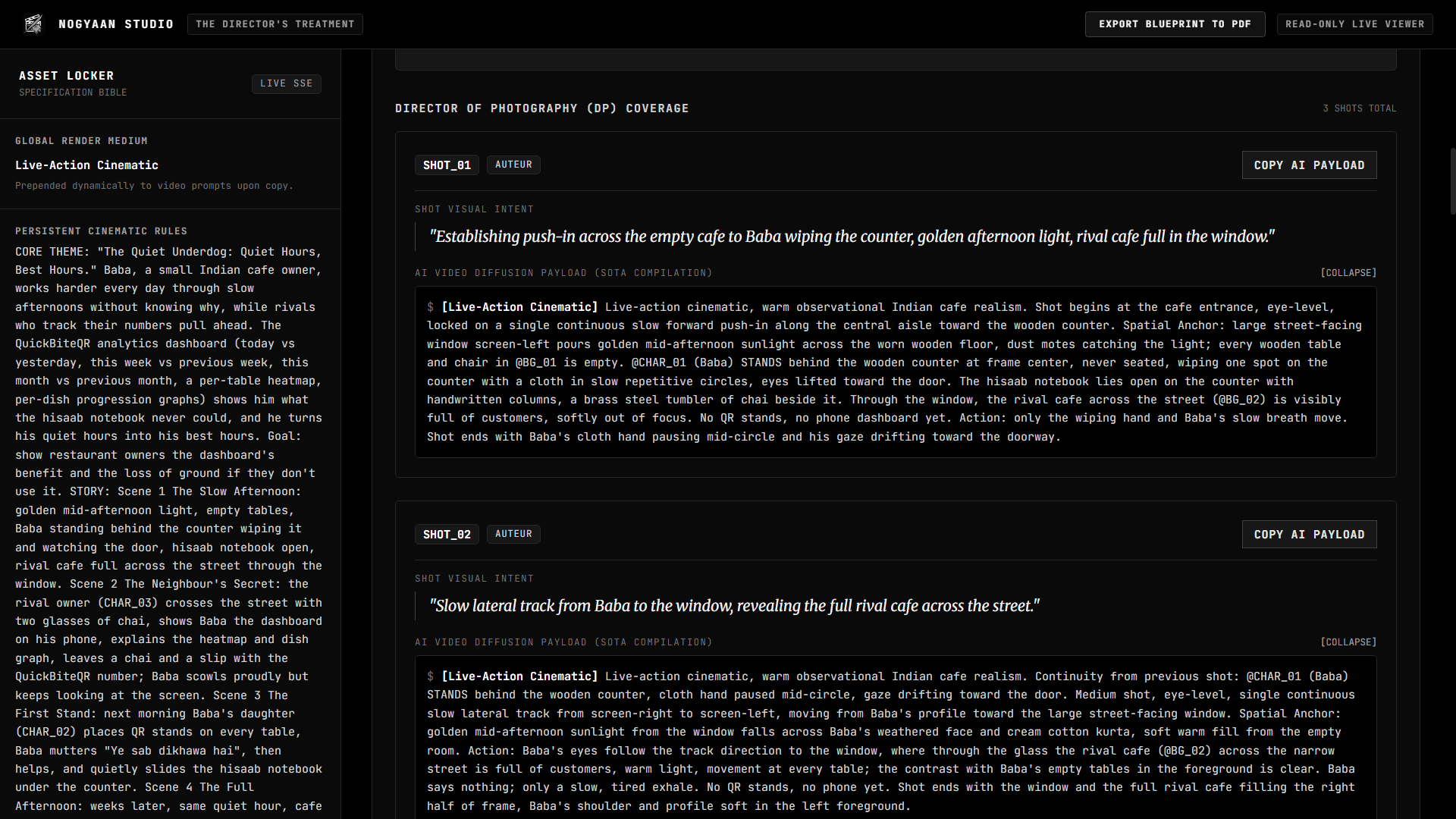
With one click, you can
Export to PDF. nogyaan bypasses screenshots and generates a native, selectable-text PDF Blueprint. You can share this flawless Director's Treatment with clients, or open it on your iPad while you drop the prompts into Runway.
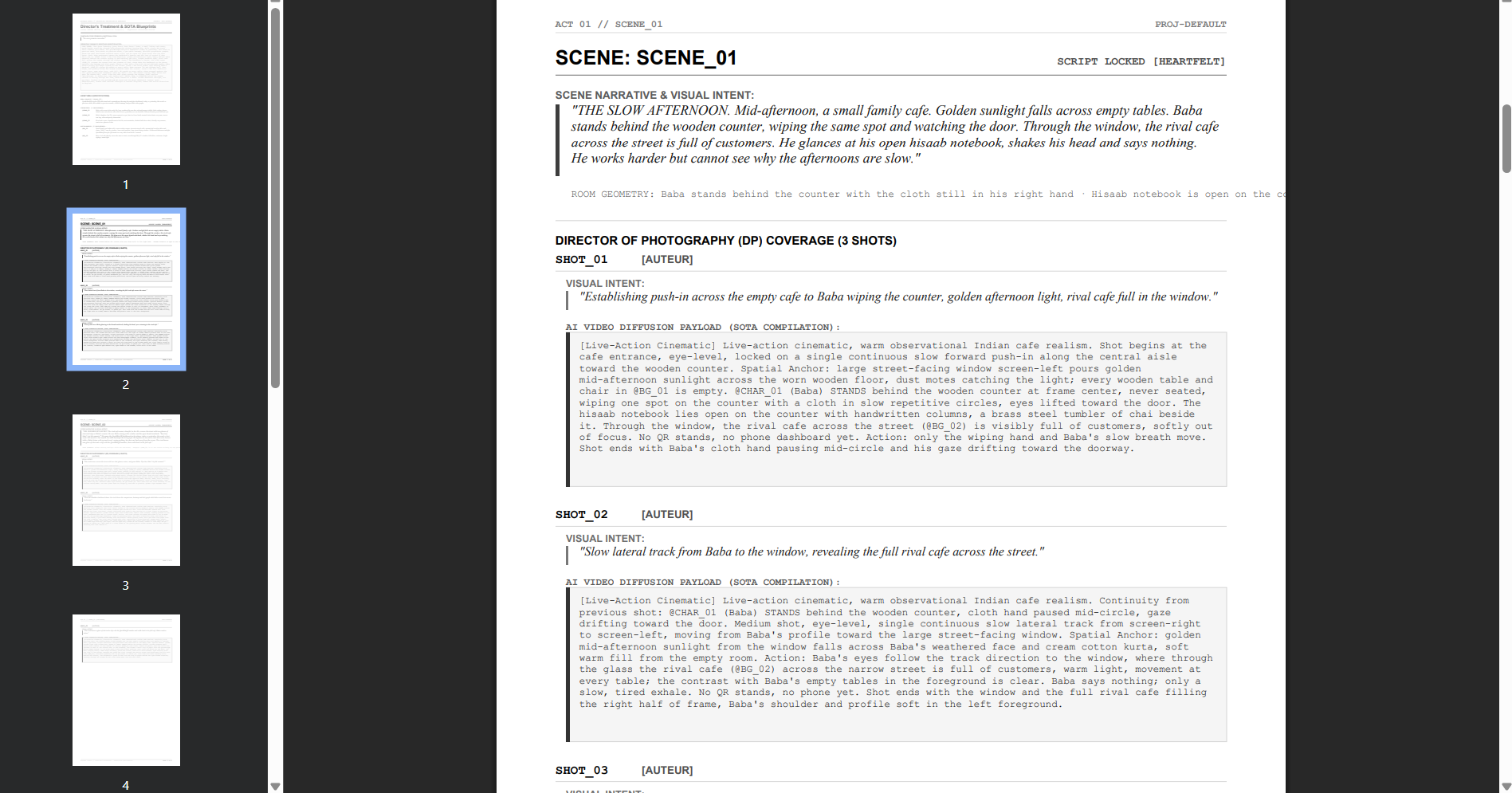
The Bottom Line
You shouldn't be typing out "35mm anamorphic, slow pan left, shallow depth of field" while trying to figure out a good story. nogyaan separates the art from the physics. You bring the human taste. The machine does the technical heavy lifting.
1793982007557-9p6w.png
PNG · 1536×1024
Example file from a real run - the skill writes it into your workspace.
Connects securely to your tools. The creator never sees your data.
About this skill
Producing high-fidelity video ads requires bridging the gap between creative storytelling and technical diffusion physics. This skill acts as an Executive Creative Director and DP, orchestrating the entire production pipeline from initial brief to SOTA video prompts without the typical wall-of-text fatigue. It solves the problem of "prompt drift" and disjointed scenes by enforcing strict temporal handshakes and spatial anchoring between shots.
What it does
- Multi-Framework Directing adapts scripts for Indian D2C emotional storytelling, high-craft developer product launches, or high-retention TikTok UGC.
- Decision Branching manages narrative flow through a 1/2/3/R protocol, ensuring user control at every plot twist and scene catalyst.
- Interactive DP Suite pitches three distinct visual personas (Auteur, Kinetic, Theatrical) for every shot before compiling technical payloads.
- SOTA Physics Compilation generates dense diffusion prompts for Kling, Runway, and Sora with single-vector camera movements and spatial anchoring.
- Asset Locker Management persists character, background, and product consistency throughout the entire DAG session.
How it works
- Intake Gate: Provide the brand name, product details, and emotional objective to initialize the campaign brief.
- Core Theme Selection: Choose from three abstract creative premises to lock the campaign's visual and emotional DNA.
- Narrative Branching: Progress through a 4-act structure (Setup, Catalyst, Twist, Climax) using single-keystroke inputs.
- Shot Direction: Review three human-readable visual pitches per shot and select one to generate the technical diffusion payload.
Frameworks & tools
Built for modern video diffusion workflows including Kling 3.0, Veo 3.1, Runway Gen-4.5/Gen-3, and Sora. It utilizes MCP tools for state persistence and a local director's treatment dashboard.
Why this beats prompting it yourself
Writing prompts for video is prone to character drift and impossible camera compound moves that break diffusion models. This skill enforces "temporal handshakes" where every shot's ending frame matches the next shot's start, ensuring professional continuity that manual prompting can't maintain.
Use cases
- D2C Brand Films: Creating emotional Hinglish-based narratives for the Indian market.
- SaaS Product Launches: Directing cinematic "developer cinema" that visualizes technical pain points and solutions.
- Social Ad Testing: Rapidly generating multiple high-hook UGC variations for vertical video platforms.
Known limitations
Requires specific MCP tool connectivity for state persistence. Does not support compound camera movements (e.g., pan-then-tilt) to maintain diffusion stability.
Requires MCP tool support for state persistence. Limited to single-vector camera moves per shot. Mandatory intake flow requires three specific brand details to start.
How to use
- 1
Connect your agent to the Agensi MCP
Copy the prompt and paste it into Claude, ChatGPT, Cursor or any agent that supports MCP. It sets up the connection for you. Manual setup
- 2
Sign in to Agensi
Your agent shows a sign-in link. Sign in and click Allow.
- 3
Ask for what you need
Your agent loads this skill and uses it on your task. It always asks before any payment.
Reviews
No reviews yet
Be one of the first to try it. Every listed skill goes through the trust checks below.
Security scanned
Checked by our 8-point scan before listing
Fresh listing
Recently published to Agensi
Free to use
No account required to browse
Trust & safety
Security scan
Security scan passed today
- Free with an Agensi account
Requires
 Cloudflare
 Anthropic
 OpenAI
 Googleapis
 Gstatic
 Tailwindcss
 Unpkg
 Node.js
 Git
Permissions
Allowed Hosts