mcpkit
Find the problems that break an MCP server in specific MCP clients (Claude, ChatGPT, Cursor, VS Code, Codex and more), with sourced client facts, SDK upgrade help and CI output.
Free
Works with the AI Agents you already use
 Claude Code
 Cursor
 Codex CLI
 Muse
Muse Dots+22 moreClaude CodeCursorCodex CLIMuseDots
 OpenClaw
 Manus
Manus Grok
Grok Grok Bot+18 agents
mcpkit
Example session with this skill installed
Run mcpkit on my local Node.js server at dist/index.js and check compatibility for Claude and Cursor.
- Read your context and instructions
- Compiled the mcpkit
I have completed the compatibility check for your MCP server. The validator identified one critical naming issue and a missing title annotation that affects how tools are displayed in Cursor.
MCP Compatibility Report
| Client | Check ID | Severity | Message | Fix |
|---|---|---|---|---|
| Cursor | TOOL_NAME_CLIENT_COLLISION | ❌ FAIL | fetch.user and fetch_user collide after normalization. | Use unique names with only _ or -. |
| Claude | TOOL_TITLE_MISSING | ℹ️ INFO | Tool get_weather is missing a human-readable title. | Add title: "Get Weather" to tool metadata. |
| General | SDK_OUTDATED | ⚠️ WARN | Using @modelcontextprotocol/sdk@0.5.0. | Run npx -y @vrajved/mcpkit upgrade. |
| General | TRANSPORT_STDOUT_POLLUTION | ✅ PASS | No illegal stdout writes detected. | N/A |
Next steps
- Rename
fetch.usertofetch_user_datainsrc/tools.tsto avoid the Cursor collision. - Add
annotations: { title: "..." }to all tool definitions to improve UI rendering. - Execute
npx -y @vrajved/mcpkit upgrade --applyto move to the latest MCP SDK.
Connects securely to your tools. The creator never sees your data.
About this skill
Building Model Context Protocol (MCP) servers is difficult because every client—Claude Desktop, ChatGPT, Cursor, VS Code, and others—implements the protocol with unique constraints. A server that works in one environment might silently fail in another due to name truncation, schema depth limits, or handling of structured content.
What it does
- Multi-client validation checks server definitions against known constraints for Claude Desktop, ChatGPT, Cursor, VS Code, Cline, and more.
- Protocol inspection records exactly what the server exposes including tools, resources, and prompts.
- Schema auditing identifies deep nesting or root-level combinators that break specific LLM clients.
- Runtime probing optionally executes tools with
readOnlyHintto verify output schema compliance. - SDK management detects outdated MCP SDKs across Node.js, Python, Go, and Rust and provides precise upgrade commands.
- Transport verification catches stdout pollution that corrupts JSON-RPC messages on stdio transports.
How it works
- Run
npx -y @vrajved/mcpkit -- [start command]to boot the server and perform a full suite of cross-client checks. - Review the Markdown report for
FAILandWARNstatuses, each containing a specificcheckIdand a concrete fix. - Use the
upgradecommand to check for SDK updates and optionally apply them if the environment allows. - Integrate with CI using the
-f githubflag to surface protocol violations directly in pull request annotations.
Frameworks & tools
Works with any MCP server regardless of language (Node.js, Python, Go, Rust). Requires Node.js 20+ to run the validator. Supports both stdio and Streamable HTTP transports.
Why this beats prompting it yourself
LLMs often guess at protocol limits or rely on outdated documentation. This tool uses a sourced database of real-world client behaviors to catch silent failures, like name collisions in VS Code or schema stripping in Codex CLI, that simple prompting cannot detect.
Proven on real projects
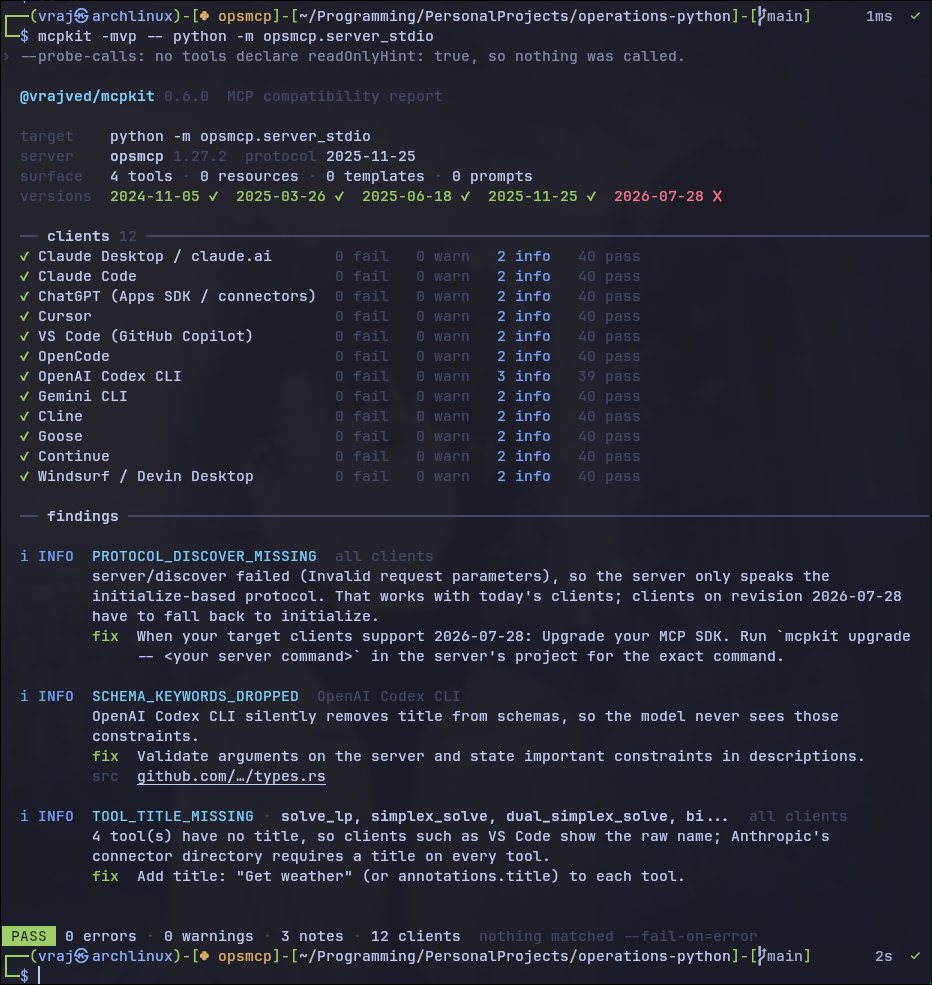
Run against a live 4-tool MCP server (an LP-solver exposed over MCP) across all 12 supported clients: 0 fails, 0 warnings, 3 informational notes across the whole surface. This is the same validator you'd run against your own server, not a curated example.
Use cases
- Validating a new MCP server before deployment to ensure cross-client compatibility.
- Debugging why tools disappear in specific editors like Cursor or VS Code.
- Verifying that tool results containing
structuredContentalso provide required text fallbacks. - Auditing OAuth 2.0 implementations for PKCE S256 compliance required by ChatGPT.
Known limitations
The tool requires a functional build of the server to run. Probing is limited to tools marked as read-only to prevent side effects. Remote servers require reachable URLs and valid headers.
How to use
Skills on Agensi run inside your AI agent. Copy the prompt, paste it into your agent, and it connects to Agensi and installs this skill for you. If a payment is needed, your agent shows it to you first.
Reviews
No reviews yet
Be one of the first to try it. Every listed skill passes our trust checks below.
Security scanned
Passed our 8-point scan before listing
1 install
Downloaded by developers to date
Free forever
No account required to browse
Trust & safety
Security scanned
Verified clean 4 days ago
- Free to download with an account
Requires
 Node.js