More screenshots
Works with the AI Agents you already use
 Claude Code
 Cursor
 Codex CLI
 Muse
Muse Dots+22 moreClaude CodeCursorCodex CLIMuseDots
 OpenClaw
 Manus
Manus Grok
Grok Grok Bot+18 agents
how-long: Live Progress Bar & ETA
Claude publishes a live progress page for long tasks: steps, a segmented progress bar, time elapsed and an ETA that learns from real timings.
$1

how-long: Live Progress Bar & ETA
Example session with this skill installed
Go through the 12 CSV files in ./sales-2025: clean them, compute the quarterly metrics, draw the charts and write up the Q3 report. It'll take a while, so show me a progress bar and how long it will take.
- Read your context and instructions
- Compiled the how-long
- Generated the document
Summary
Live progress is on. I published a page called
"Q3 report progress": open its card in this conversation at any time to see what I'm doing and how long is left. I update it at every step.
The progress page, 25 minutes in
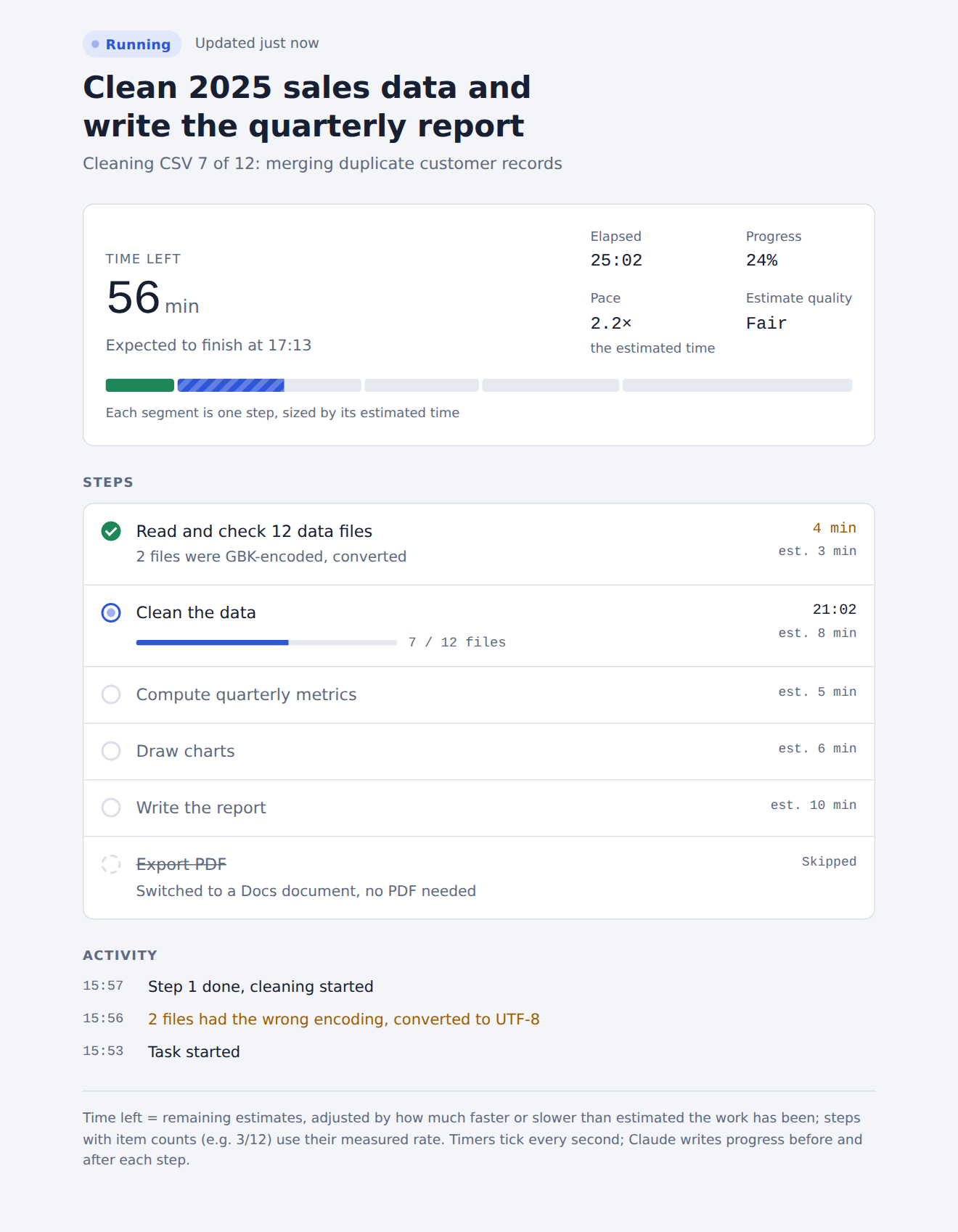
| # | Step | Status | Time | Estimate |
|---|---|---|---|---|
| 1 | Read and check 12 data files | Done (2 files were GBK-encoded, converted) | 4 min | 3 min |
| 2 | Clean the data | Running, 7 / 12 files | 21 min | 8 min |
| 3 | Compute quarterly metrics | Pending | 5 min | |
| 4 | Draw charts | Pending | 6 min | |
| 5 | Write the report | Pending | 10 min | |
| 6 | Export PDF | Skipped: switched to a Docs document | 2 min |
Time left: 56 min ·
Expected to finish: 17:01 ·
Progress: 24% ·
Pace: 2.2× the estimated time ·
Estimate quality: Fair
Activity
- Task started
- 2 files had the wrong encoding, converted to UTF-8 (warning)
- Step 1 done, cleaning started
When it finishes
The page switches to
Done, shows the total time and a one-line result, for example: "Report done: 18 pages with 6 charts. Q3 revenue up 12% on Q2." If your agent supports push notifications, you get one as well.
Next steps
- Keep working on something else: the page updates by itself
- Ask "how long is left?" at any time, or just open the card
- Say "no progress page" to turn it off for the rest of the conversation
screenshot-light-en.png
PDF · document
Example file from a real run - the skill writes it into your workspace.
Connects securely to your tools. The creator never sees your data.
About this skill
Long agent tasks are a black box: you can't tell how far along Claude is or how much longer it will take. how-long fixes that. At the start of a long task, Claude publishes a live progress page you can open at any time.
What you see
- What Claude is doing right now
- Every step, with its status and time taken
- A segmented progress bar, each segment sized by that step's estimated time
- Time elapsed, time left and the expected finish time
- Whether the work is running faster or slower than estimated ("20% slower than estimated")
- A short activity log
The page updates live, with no refresh. It follows your language (English or Chinese) and your light or dark theme.
When it kicks in
- Tasks Claude expects to take about 10 minutes or more, or with 6 or more steps
- Whenever you ask for a progress bar, progress updates, an ETA or "how long"
- Say "no progress page" and it stays off for the rest of the conversation
How the ETA works
Claude estimates each step when it plans the task. The page learns a pace from real timings (actual time compared with the estimates, smoothed so one early outlier doesn't swing it), uses the measured rate for steps like "7 / 12 files", and leaves time spent waiting for your reply out of the estimate. If updates stop for a long time, the page says the task may have stopped instead of claiming it is still running.
Built for long runs
Claude saves the page address in progress-state.json, so if its context is compacted halfway through, it finds the page again and keeps updating it.
Requirements
The live page uses Claude's artifacts with a database (the Artifact and ArtifactData tools): the Claude app and Claude Code sessions that have artifacts. In agents without them, the skill falls back to the agent's own task list or a checklist, so you still get step tracking, but no live page or ETA.
Open source (MIT): https://github.com/bhu0345/claude-how-long Live demo: https://bhu0345.github.io/claude-how-long/en/
How to use
Skills on Agensi run inside your AI agent. Copy the prompt, paste it into your agent, and it connects to Agensi and installs this skill for you. If a payment is needed, your agent shows it to you first.
Reviews
No reviews yet
Be one of the first to try it. Every listed skill passes our trust checks below.
Security scanned
Passed our 8-point scan before listing
Fresh listing
Recently published to Agensi
Money-back guarantee
Doesn't do what its page promises? You get your money back.
Trust & safety
Security scanned
Verified clean 4 days ago
- Passed all security checks, Safe to install
Requires