More screenshots
Works with the AI Agents you already use
 Claude Code
 Cursor
 Codex CLI
 DeepSeek
 Muse+22 moreClaude CodeCursorCodex CLIDeepSeekMuse
 Dots
 Manus
 Grok
 Grok Bot+18 agents
FlowForge — Draw.io Diagrams from Text
Turn natural language or design docs into editable, WCAG-audited draw.io (.drawio) XML diagrams across 13 deterministic layout algorithms and 5 semantic color themes, with built-in validation.
Free
FlowForge — Draw.io Diagrams from Text
Example session with this skill installed
/FlowForge "Draw a CI/CD deployment pipeline with Code Commit, Build, Automated Tests, Staging Deploy, Production Release, and an Alert rollback branch on test failure" --type flow --theme tech-blue
- Read your context and instructions
- Compiled the flowforge
- Generated the app files
Summary
Generated a 5-step horizontal CI/CD flow diagram with an error branch in the tech-blue theme, validated cleanly with validate.py.
Step 1 — Proposed ASCII Sketch
Direction: left-to-right | Nodes: 6 | Type: flow | Theme: tech-blue

[primary] Code Commit → [process] Build & Package → [process] Automated Tests → [process] Staging Deploy → [accent] Production Release
                                                            ↓ (fail)
                                                    [error] PagerDuty Alert & Rollback
Step 2 — Coordinate & Validation Check
$ python3 skills/FlowForge/scripts/validate.py ./diagrams/cicd-pipeline.drawio --theme tech-blue
OK: XML well-formed, 14 cells, 0 overlaps, all 5 edges orthogonal, canvas bounds 1180x420 verified, WCAG contrast & tech-blue palette compliant.
Step 3 — Deliverable Snippet (./diagrams/cicd-pipeline.drawio)
<mxfile host="app.diagrams.net">
  <diagram name="How Code Flows from Commit to Production" id="flowforge-cicd">
    <mxGraphModel dx="1180" dy="420" grid="1" gridSize="10" pageWidth="1180" pageHeight="420">
      <root>
        <mxCell id="0" />
        <mxCell id="1" parent="0" />
        <!-- Orthogonal edges and semantic tech-blue nodes generated deterministically -->
      </root>
    </mxGraphModel>
  </diagram>
</mxfile>
Next steps
- Open
./diagrams/cicd-pipeline.drawioin
draw.io Desktop or
https://app.diagrams.net to view, export to SVG/PDF/PNG, or customize nodes.
1793235047365-tcif.png
ZIP · project files
Example file from a real run - the skill writes it into your workspace.
Connects securely to your tools. The creator never sees your data.
About this skill
What is FlowForge?
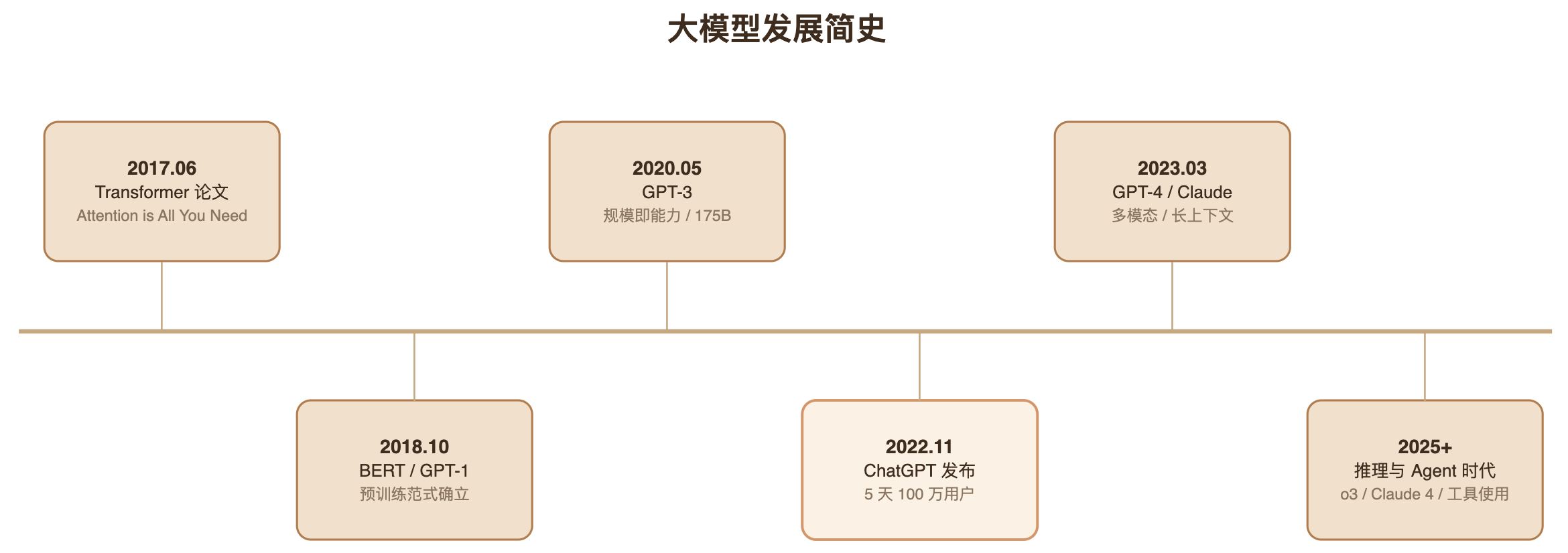
FlowForge turns natural language descriptions and technical documents into clean, publication-ready draw.io (.drawio XML) diagrams — flowcharts, system architectures, algorithm comparisons, decision trees, sequence diagrams, timelines, and swimlanes.
Instead of relying on an LLM to "guess" pixel coordinates or produce uneditable static images, FlowForge uses 13 deterministic coordinate layout algorithms, 5 semantic color themes (audited against WCAG contrast targets), and a built-in Python XML/geometry validator (scripts/validate.py) so every diagram opens cleanly in app.diagrams.net, draw.io Desktop, VS Code, or Confluence.
Key Features
- 13 Deterministic Layout Algorithms:
- Core:
flow(left-to-right),flow-vertical(top-down),compare(side-by-side A vs B),layers(multi-tier architecture stacks),loop(iterative cycles),tree(hierarchies & decision trees),hub(hub & spoke) - Extended:
columns(3+ parallel concepts),matrix(multi-criteria comparisons),funnel(conversion/filtering),timeline(chronological evolution),sequence(component interactions),swimlane(cross-role processes)
- Core:
- 5 WCAG-Audited Color Themes:
tech-blue(default — blue-gray + warm accents for system docs)morandi(muted sage + smoky purple for design decks)mint(mint green + warm yellow for product flows & user journeys)terracotta(earthy clay + sand for strategy & operations)indigo(bold indigo + violet for tech launches & presentations)
- Size-Adaptive Color Budget (The 4+6 Rule):
- Automatically balances 4 base semantic roles (
primary,process,accent,neutral), 6 extended roles (success,warning,error,secondary,storage,group), and 5 background tints (bg-1…bg-5) so diagrams never look like a "rainbow wall."
- Automatically balances 4 base semantic roles (
- Sketch-First Workflow:
- Proposes the diagram type, color theme, and an ASCII structure preview in one confirmation step before generating XML (or runs autonomously in batch/CI).
- Mandatory Deterministic Validation (
scripts/validate.py):- Automatically checks XML well-formedness, unique cell IDs, dangling arrow references, orthogonal edge routing (
edgeStyle=orthogonalEdgeStyle), canvas bounds, node overlap, container z-order, text-fit estimates, and theme color compliance.
- Automatically checks XML well-formedness, unique cell IDs, dangling arrow references, orthogonal edge routing (
- Visual Self-Check (
scripts/render.sh):- When the draw.io CLI is available, exports a
.pngpreview and inspects the rendered diagram for visual balance.
- When the draw.io CLI is available, exports a
- Bilingual Support:
- Generates labels naturally in English or Chinese while preserving technical abbreviations (
API,LLM,RAG,CI/CD).
- Generates labels naturally in English or Chinese while preserving technical abbreviations (
Installation & Usage
Via Agensi MCP
Connect Agensi MCP to your agent (Claude Code, Cursor, Codex CLI, GitHub Copilot, Windsurf, Grok Bot, etc.) and ask naturally:
Draw a 5-layer system architecture diagram for our RAG pipeline
Compare PPO vs DPO vs GRPO training loops side by side
Make a database selection decision tree in the mint theme
Direct CLI / Slash Command Usage
/FlowForge "OAuth 2.0 authorization code flow"
/FlowForge path/to/design-doc.md --type layers --theme morandi
/FlowForge "CI/CD pipeline" --type loop
Open Source Repository
- GitHub: https://github.com/wentong2022-arch/flowforge-skill
- License: MIT (
v1.2.0)
Find more skills like this on the Claude Skills Marketplace, the Codex Skills Marketplace and the Gemini Skills Marketplace, or browse Claude Skills for Technical Documentation.
Designed for structured diagrams (flowcharts, architectures, comparisons, trees, timelines, sequences, swimlanes) in draw.io XML format. Does not generate statistical data plots (bar/line charts) or artistic illustrations/logos. Automated PNG export (scripts/render.sh) requires the local draw.io desktop app CLI; without it, FlowForge still validates and delivers the .drawio XML file.
How to use
- 1
Connect your agent to the Agensi MCP
Copy the prompt and paste it into Claude, ChatGPT, Cursor or any agent that supports MCP. It sets up the connection for you. Manual setup
- 2
Sign in to Agensi
Your agent shows a sign-in link. Sign in and click Allow.
- 3
Ask for what you need
Your agent loads this skill and uses it on your task. It always asks before buying a skill.
Reviews
No reviews yet
Be one of the first to try it. Every listed skill goes through the trust checks below.
Security scanned
Checked by our 8-point scan before listing
Fresh listing
Recently published to Agensi
Free to use
No account required to browse
Trust & safety
Security scan
Security scan passed 19 days ago
- Free with an Agensi account
- Software
Python 3
Git
Permissions
File Scopes
Uses Read/Write Files to inspect source documents and save generated .drawio XML diagrams, and Terminal/Shell to run the local Python geometry/theme validator (scripts/validate.py). Makes zero external network calls.