More screenshots
Works with the AI Agents you already use
 Claude Code
 Cursor
 Codex CLI
 Muse
Muse Dots+22 moreClaude CodeCursorCodex CLIMuseDots
 OpenClaw
 Manus
Manus Grok
Grok Grok Bot+18 agents
Flow Scoper
Map every happy path, edge case, and failure state for user flows before prototyping.
Free

Flow Scoper
Example session with this skill installed
Help me scope an "Invite teammate" flow for our B2B SaaS web app. An Admin opens Team settings, enters an email and picks a role (Admin or Member), and the teammate gets an email with a link to join.
Users: workspace Admins (inviting) and invited teammates (new to the product).
Web only, US only for now. We use a third-party email service to send invites.
Business rules: seats are limited by plan, and invite links expire after 7 days.
Known pain point: people say they never got the email.
- Read your context and instructions
- Compiled the flow scoper
- Generated the UI component
Invite teammate: Path Map
Happy path
- Admin opens Team settings
- Admin enters an email and picks a role
- Admin sends the invite
- System sends the email
- Teammate clicks the link in the email
- Teammate creates a password
- Teammate lands in the workspace
Alternate paths
| Route | What it is | Status |
|---|---|---|
| Admin copies the invite link and sends it themselves | Gets the teammate in without relying on email | Not yet designed |
| Support agent sends or resends the invite for the Admin | Same outcome, but the invite doesn't show who sent it | Supported but inconsistent |
| Teammate already has an account | Signs in instead of creating a password | Already supported |
| Teammate opens the link on a phone and finishes there | The setup page hasn't been checked on a small screen | Not yet designed |
Unhappy paths by step
Step 2: Enter email and role
| What happens | What to show |
|---|---|
| They typed the email in a way we don't recognize (missing @, extra space) | Show "That email doesn't look right" under the field and keep what they typed |
| That person is already on the team | Say "[email] is already on your team" and don't send a second invite |
| That email already has a pending invite | Say "Invite sent on [date]" and offer Resend |
Step 3: Send invite
| What happens | What to show |
|---|---|
| No free seats left on their plan | Say they've used all their seats and offer to remove someone or upgrade |
| Another Admin took the last seat a moment earlier | Say the seat was just taken and show the updated count |
| They got logged out partway through | Ask them to sign in again and keep the form filled in |
| Someone is sending a lot of invites in a row | Pause with "Too many invites right now, try again in a few minutes" |
Step 4: System sends the email
| What happens | What to show |
|---|---|
| The system couldn't reach the email service in time | Say "We couldn't send the invite, try again". Don't show "Invite sent" and don't use up a seat |
| The email never arrives (spam folder, blocked by the company's mail server). This is the known pain point | Show "Sent to [email] on [date]" with Resend and Copy link, and a hint to check spam |
Step 5: Teammate clicks the link
| What happens | What to show |
|---|---|
| The link has expired after 7 days | Say "This invite expired" and let them request a new one, which notifies the Admin |
| The link was already used | Say "This invite was already used" and offer Sign in |
| The Admin cancelled the invite | Say "This invite is no longer valid, ask [Admin name] for a new one" |
Step 6: Create password
| What happens | What to show |
|---|---|
| The password doesn't meet the rules | Show the rules as they type, not only after they submit |
| Someone using a screen reader can't tell what the password rules are | Label the rules and read errors out loud |
| They close the tab halfway | The link keeps working until it expires, so they can pick up where they left off |
Open design questions
- Does a pending invite hold a seat, or only an accepted one?
- Should Admins be able to copy a link instead of sending an email?
- When seats run out, who sees the upgrade option: any Admin or only the billing owner?
- Does inviting someone as an Admin need a second confirmation?
Flow diagram
Every step and branch from the result above, in one picture.
| Step | Another valid way to get here | What can go wrong, and what to show |
|---|---|---|
| 2. Enter email and role | Admin copies the invite link instead | Bad email, already on the team, pending invite |
| 3. Send invite | Support agent sends it for the Admin | No seats left, seat taken by another Admin, logged out, rate limit |
| 4. System sends the email | Admin shares the link by hand | Email service down, email never arrives |
| 5. Teammate clicks the link | Opens it on a phone | Expired, already used, cancelled |
| 6. Create password | Existing account signs in instead | Weak password, screen reader, closed tab |
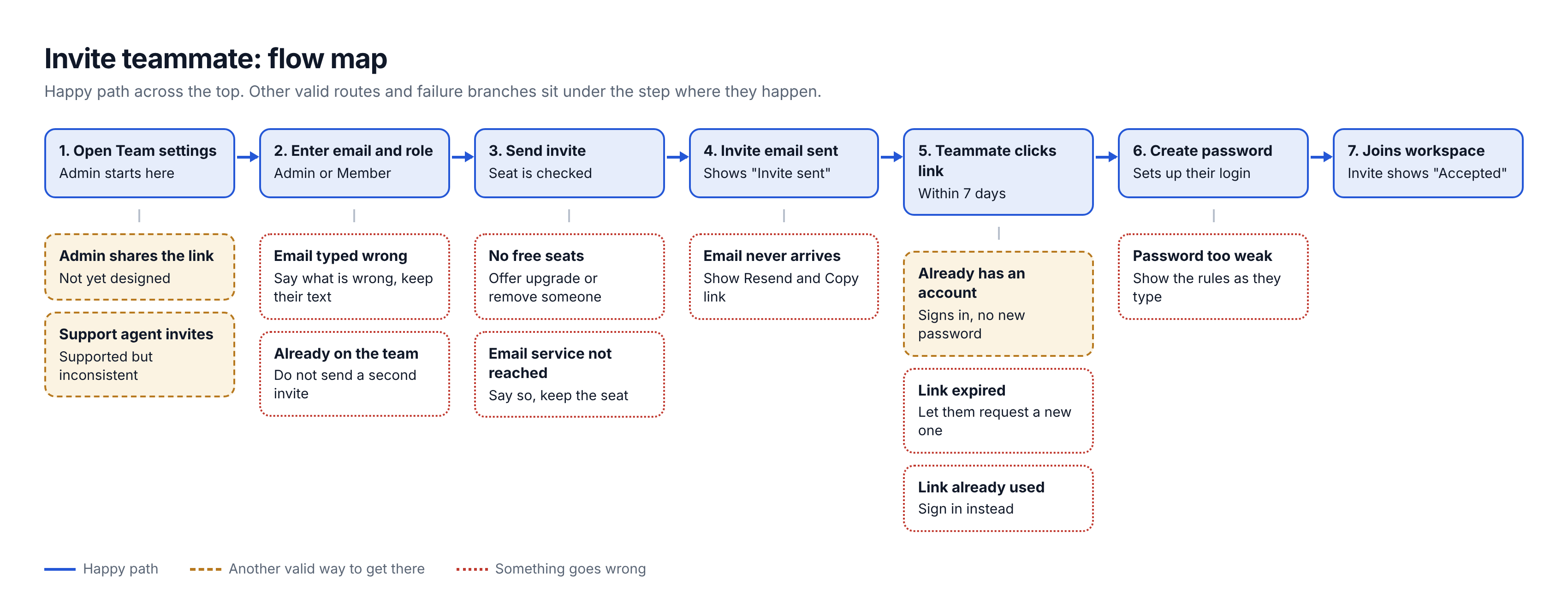
invite-teammate-flow-diagram.png
TSX · React component
Example file from a real run - the skill writes it into your workspace.
Connects securely to your tools. The creator never sees your data.
About this skill
Designing a new feature usually starts with the happy path. Edge cases and errors get discovered later by frustrated users or QA. Flow Scoper brings that discovery forward: before a wireframe is drawn or a line of code is written, it maps the other valid routes and everything that can go wrong, specific to your product and your users.
What it does
- Context-driven scoping asks eight short questions about your goal, steps, users, devices, regions, third-party services and business rules, so the result isn't generic.
- Path mapping produces the happy path, the alternate routes (a support agent doing it by hand, an API, a different device) with their design status, and the failure states at each step.
- Edge case coverage works through a 17-category checklist and keeps only the categories that apply to your flow, from invalid input and empty states to payment provider failures and regional data rules.
- Flow diagram shows the happy path, other valid routes and failure branches in three distinct styles, with what the person should see at each branch.
How it works
- Trigger it with a flow name, or type /flow-scoper to get the context form.
- Answer what you know. Skip anything you don't, and the output flags which branches stayed generic because of it.
- Review the written breakdown and the diagram, then resolve the open design questions it lists.
Who it's for
PMs, founders, engineers and designers scoping a flow before design or build. It works for any product on web or mobile apps.
Why not just prompt it yourself
A plain prompt tends to return "an error occurred" for every step. This skill ties each branch to the personas, devices, dependencies and rules you named, and writes them in plain language that a designer, an engineer and a stakeholder can all read.
Output
A structured Markdown breakdown and a branching flow diagram (Mermaid when the agent can't draw inline).
Not using an agent?
Use the free copy-prompt page and paste the result into any AI chat: https://mayankjain1717.github.io/flow-scoper/?ref=agensi
Install through Agensi
New to Agensi? Setup guide for connecting your agent: https://www.agensi.io/docs/mcp-setup
- Claude Code and other agents that can add an MCP server: copy the prompt from the "How to use" box on this page and paste it into your agent.
- Claude.ai: add Agensi as a custom connector first (Settings → Connectors → Add custom connector, name
agensi, URLhttps://mcp.agensi.io/mcp), then start a new chat and paste the prompt.
Feedback
Tried it? Tell me what worked and what it missed with this 2-minute form (optional): https://docs.google.com/forms/d/e/1FAIpQLSeMYKyWo4VVqg0N4WXX8QX6J391Rq1nyJQirtw60x9gmpiwNQ/viewform
License
CC BY-NC 4.0: free to use, share and adapt with credit to Mayank Jain, not for commercial use.
How to use
Skills on Agensi run inside your AI agent. Copy the prompt, paste it into your agent, and it connects to Agensi and installs this skill for you. If a payment is needed, your agent shows it to you first.
Reviews
No reviews yet
Be one of the first to try it. Every listed skill passes our trust checks below.
Security scanned
Passed our 8-point scan before listing
Fresh listing
Recently published to Agensi
Free forever
No account required to browse
Trust & safety
Security scanned
Verified clean 2 days ago
- Free to download with an account
Requires
 Node.js