More screenshots
Works with the AI Agents you already use
 Claude Code
 Cursor
 Codex CLI
 DeepSeek
 Muse+22 moreClaude CodeCursorCodex CLIDeepSeekMuse
 Dots
 Manus
 Grok
 Grok Bot+18 agents
Email Testing
Free, open-source email client emulator and compatibility checker for Outlook, Gmail, Apple Mail and more. Preview, diagnose and fix email rendering issues locally without paid subscriptions.
Free

Email Testing
Example session with this skill installed
Check how my email renders in Outlook, Gmail and Apple Mail, identify any compatibility issues and fix them.
- Read your context and instructions
- Compiled the email testing
Summary
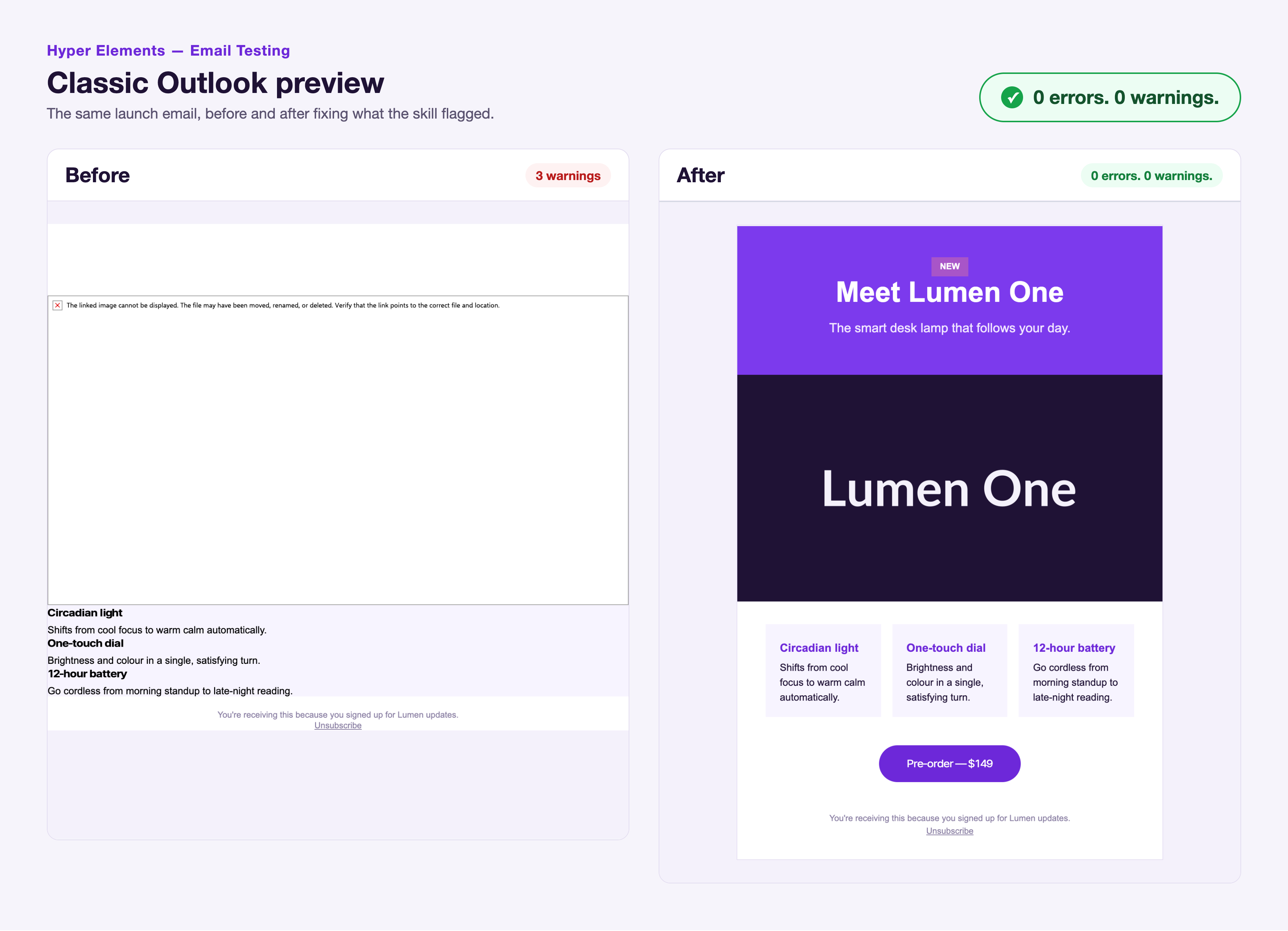
I tested your HTML product launch email across Outlook, Gmail and Apple Mail using Hyper Elements' free, local email client emulator, identified client-specific rendering issues and fixed them while preserving the original design as closely as possible.
The corrected email passes the compatibility check with 0 errors and 0 warnings.
Email client analysis
| Client | Before | After |
|---|---|---|
| Outlook | Missing product image, invisible CTA, broken layout and missing background | Layout, image and CTA restored; minor cosmetic differences remain |
| Gmail | Broken button styling, incorrect colours and misplaced elements | No rendering changes detected |
| Apple Mail | Rendered as designed | Rendered as designed |
Fixes applied
- Replaced unsupported flexbox layouts with email-compatible tables.
- Added solid background fallbacks for unsupported gradients.
- Replaced CSS variables with inline colour values.
- Converted the unsupported WebP image to PNG.
- Fixed CTA button rendering using Outlook-compatible VML.
- Corrected missing language attributes and heading hierarchy.
Validation results
| Metric | Before | After |
|---|---|---|
| Errors | 0 | 0 |
| Warnings | 3 | 0 |
| Informational findings | 7 | 2 |
The two remaining informational findings relate to Outlook's limited support for gradients and media queries. Appropriate fallbacks are in place.
Deliverables
- Original HTML email:
email/original/launch.html - Corrected HTML email:
email/fixed/launch.html - Before-and-after visual previews:
email/previews/ - Full client-specific previews and comparison galleries.
All testing was performed locally, without sending emails to real inboxes or requiring a paid testing subscription.
Next steps
- Review the updated visual previews.
- Use the corrected HTML email in your preferred email sending platform.
- Run the same compatibility checks whenever you update your email templates.
This demonstration uses a sample product launch email with intentionally introduced compatibility issues. Previews model email client rendering behavior rather than capturing screenshots from actual email clients.
Connects securely to your tools. The creator never sees your data.
About this skill
Test how your HTML emails render across different email clients without relying on expensive screenshot services like Litmus or Email on Acid.
Hyper Elements provides a free, open-source email client emulator that enables developers and AI agents to preview, diagnose and fix email rendering issues directly within their development environment.
What it does
- Local rendering: Generate client-specific email previews without third-party accounts or subscriptions.
- Compatibility analysis: Identify HTML and CSS that individual email clients remove, modify or do not support.
- Screenshot generation: Create PNG screenshots of modeled email previews, including desktop and mobile variants.
- Dark mode testing: Preview supported dark mode behaviors across Apple Mail, Outlook for Mac, Yahoo Mail and AOL Mail.
- Accessibility checks: Identify accessibility issues and receive actionable guidance on how to fix them.
- Framework-independent testing: Works with raw HTML, MJML output, React Email exports and native Hyper Elements components.
How it works
- Analyze: Check your HTML or Hyper Elements design for client-specific compatibility issues.
- Preview: Generate modeled previews for individual email clients using the CLI or Node.js API.
- Visualize: Create a comparison gallery showing how the email renders across different clients.
- Fix and validate: Apply the suggested fixes and regenerate previews to verify the updated email.
Why use this skill?
Rather than relying on an AI agent's knowledge of email client compatibility, Hyper Elements uses a purpose-built emulator developed by reverse-engineering email client behavior and testing thousands of emails.
Our testing shows approximately 98% average preview accuracy, including support for the Word-based rendering behavior of classic Outlook.
The skill gives AI agents a structured workflow for identifying and resolving email compatibility issues, reducing manual testing and eliminating the need for a paid subscription for local emulation.
Use cases
- Debugging rendering issues in classic Outlook.
- Checking Gmail compatibility and email clipping.
- Validating responsive email layouts across desktop and mobile clients.
- Testing newsletters, transactional emails and marketing campaigns.
- Generating visual email comparison galleries.
- Integrating automated compatibility checks into CI/CD workflows.
Frameworks and tools
Powered by the open-source Hyper Elements CLI and email client emulator, with optional browser-based screenshot generation using Playwright.
Known limitations
Previews model email client rendering behavior rather than capturing screenshots from actual email clients. Screenshot generation requires a Chromium-based browser. Network access may be necessary for package installation and externally hosted assets.
Find more skills like this on the Claude Skills Marketplace, the Codex Skills Marketplace and the Gemini Skills Marketplace, or browse Claude Skills for Testing & Debugging.
Requires npm access for package installation. Screenshot features require Chrome, Edge, or Playwright Chromium. Some features depend on the @hyper-elements/react library.
How to use
- 1
Connect your agent to the Agensi MCP
Copy the prompt and paste it into Claude, ChatGPT, Cursor or any agent that supports MCP. It sets up the connection for you. Manual setup
- 2
Sign in to Agensi
Your agent shows a sign-in link. Sign in and click Allow.
- 3
Ask for what you need
Your agent loads this skill and uses it on your task. It always asks before buying a skill.
Reviews
No reviews yet
Be one of the first to try it. Every listed skill goes through the trust checks below.
Security scanned
Checked by our 8-point scan before listing
Fresh listing
Recently published to Agensi
Free to use
No account required to browse
Trust & safety
Security scan
Security scan passed 1 day ago
- Free with an Agensi account
- Software
- @hyper-elements/cli
Node.js 20.6+npm/npx@hyper-elements/migrate
No paid subscription, account or API key is required. Browser dependencies are only needed for screenshot generation. Network access may be required for npm installation and external fonts or email assets.
Permissions
File Scopes