More screenshots
Works with the AI Agents you already use
 Claude Code
 Cursor
 Codex CLI
 Muse
Muse Dots+22 moreClaude CodeCursorCodex CLIMuseDots
 OpenClaw
 Manus
Manus Grok
Grok Grok Bot+18 agents
Brandline
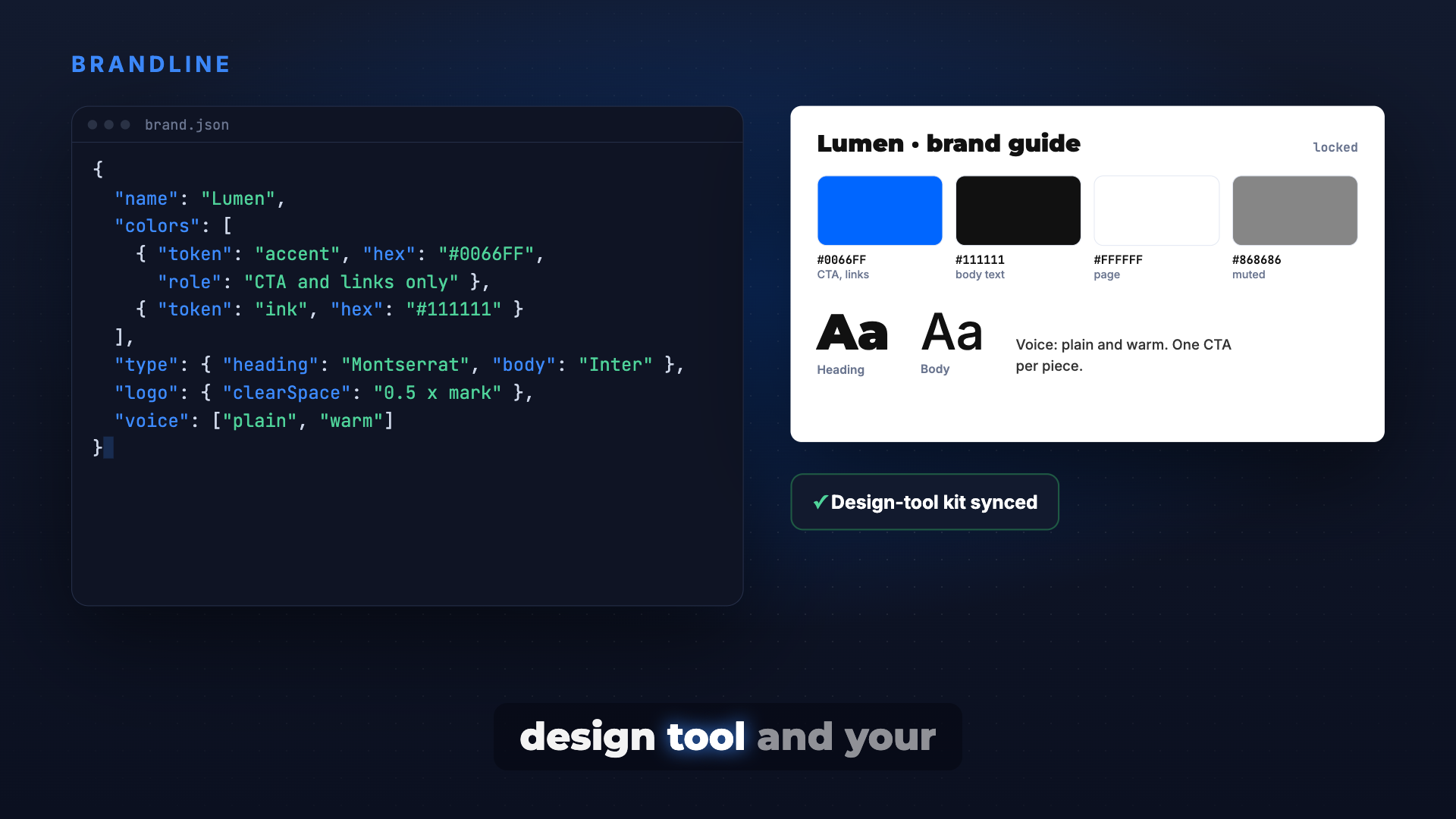
Lock your brand guideline once, store it where people and code can both read it, apply it to the app, posters, PDFs and socials, and lint it before anything ships.
$15

Brandline
Example session with this skill installed
We are rebranding to a minimalist tech vibe. Connect to my Canva kit at https://canva.com/design/DAF... and generate the brand.json and Tailwind config for our Next.js app.
- Read your context and instructions
- Compiled the brandline
- Generated the UI component
I read your Canva brand kit and the design you linked. Before anything is applied, here is the guideline to lock.
| Token | Hex | Role |
|---|---|---|
bg | #0A0A0A | page background |
surface | #262626 | cards and borders |
ink | #F5F5F5 | body text |
muted | #A3A3A3 | secondary text |
accent | #0052FF | CTA and links only, one per screen |
Type: Inter Tight for headings, Inter for body, scale 48 / 32 / 24 / 18 / 14 px, font files bundled for OG images.
Logo: wordmark used as the SVG file only, clear space 0.5 × mark height, minimum width 96 px.
Voice: short, plain, confident. Do: one accent per screen. Don't: gradients on text, retyped wordmark.
Rendered samples to check the look: samples/app-header.png and samples/poster.png.
After you reply "lock"
- Write
brand.jsonfrom the table above. - Generate the Tailwind theme and CSS variables from it; export logo, favicon and manifest icons from Canva; add a
/brandpage. - Add a guide page and text-style master to your Canva kit so the design team works from the same tokens.
- Run the brand lint: colours in
srcagainstbrand.json, brand fonts only in OG images, wordmark is the image file with clear space, links point to your real domain.
Next steps
- Look at the two samples.
- Reply "lock", or tell me what to change (colour, font or voice).
- I apply it to the app and send desktop and mobile screenshots plus the lint result.
app-header.png
TSX · React component
Example file from a real run - the skill writes it into your workspace.
Connects securely to your tools. The creator never sees your data.
About this skill
The brand starts strong, then the app uses one blue, the posters another, the PDF falls back to a default font and someone retypes the logo as text. Ask your agent to "set up our brand kit" and Brandline runs discovery with you, locks one guideline, writes it as brand.json, builds the kit in your design tool, applies it everywhere, and runs a brand lint before anything goes out.
Why it's different
- One source for people and code: the same tokens live in
brand.json, the design-tool kit and the app, with a role for every colour. - Locked before building: discovery and one or two rendered samples first, then you say "lock", so fonts and colours do not flip after the first batch.
- Checked before shipping: a lint catches stray hex values, default fonts in OG images and PDFs, retyped wordmarks, clipped logos and placeholder links.
- Built from real projects: 14 failures that actually happened, each with its guard.
What it does
- Discovery: audience, vibe, references you like and dislike, or an existing brand PDF or kit read and confirmed.
- Tokens: colours with roles, type scale and font files, logo lockups with clear space and minimum width, voice, do and don't.
- Design-tool kit: a guide page, text styles and templates in Canva, or a Bloom brand, matching
brand.json. - Apply everywhere: CSS variables or Tailwind theme, logo, favicon, manifest icons, OG images with bundled fonts, a
/brandpage, poster and PDF templates, social profile picture, cover and bio. - Brand lint: colours, fonts, logo and copy checked on every output.
How it works
- Discover in discussion mode, nothing built yet.
- Connect the design tool if you use one.
- Propose, then lock with real samples.
- Write
brand.jsonand build the kit. - Apply and lint before shipping.
Frameworks & tools
Works with any web stack (CSS variables or Tailwind). Optional design-tool connectors: Canva or Bloom. Fonts bundled from your files or fontsource for OG images and PDFs.
Use cases
- A new product or account before its first screen, poster or PDF.
- Bringing an existing brand guideline or kit into a codebase.
- Turning a favourite design into a full brand identity.
- A social rebrand: profile picture, cover, name and bio in one pass.
Known limitations
It applies and protects a brand; it does not replace a designer for logo creation. Do not use it to redesign a client brand you have no right to change. Some social steps (name changes, app-only settings) stay with you.
How to use
Skills on Agensi run inside your AI agent. Copy the prompt, paste it into your agent, and it connects to Agensi and installs this skill for you. If a payment is needed, your agent shows it to you first.
Reviews
No reviews yet
Be one of the first to try it. Every listed skill passes our trust checks below.
Security scanned
Passed our 8-point scan before listing
Fresh listing
Recently published to Agensi
Money-back guarantee
Doesn't do what its page promises? You get your money back.
Trust & safety
Security scanned
Verified clean 3 days ago
- Passed all security checks, Safe to install